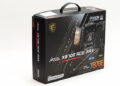

While it is indeed true that the MAG Z890 TomaHawk WiFi II’s rear I/O options are not as feature-rich as higher-tiered MSI motherboards, the Tommy team has not only covered all the bases but also done a rather good job at keeping practicality at the forefront of their priorities. This results in a “good enough” feature set that few of the intended buyers will feel is overly constrictive or constrained. Instead, this motherboard will be able to seamlessly handle the vast majority of buyers’ needs without any drama or stress. Put another way it does what all motherboard design teams strive for: offer everything necessary without unnecessarily inflating the MSRP.
It is, however, a bit quirky when compared to the competition… which are equally quirky. Just in different ways, as once again, this is not a corner of the marketplace that can tolerate “everything but the kitchen sink” levels of MSRP boosting features. Instead, all three of the boards prioritize slightly different things. Which is a good way to segue into things.
So without further preamble, let us zoom in from the fifty-foot view and start with the competition. The ASUS TuF Pro offers six (6) USB “10G” Type-A ports, zero 10G Type-C ports, zero 20G Type-C ports, but does have two (2) Thunderbolt 4 Type-C “40G” ports, which are backwards compatible to USB 20G and 10G… and 5G. It has bog-standard dual antenna headers (albeit they are ASUS’s “Q-Antenna” quick-connect style) for its WiFi 7 + BT 5.4. It offers both an HDMI and a DP video out port. Then its main claim to fame is its fully fledged audio ports with old-school five (5) 1/8th TRS “3.5mm” headers + SPDIF optical. Then, to round it out, it has a BIOS flashback button and a single 2.5GbE Intel i226 NIC. Giving it a very decent, bordering on stellar, feature set for this corner of the market.
The ROG Strix Z890-A Gaming WiFi modifies this foundation slightly. It is rocking the same Intel i226 2.5GbE NIC. Offers the same dual HDMI + DP video options. The same WiFi 7 + BT 5.4 via the same MediaTek MT7927 controller. It offers the same BIOS FlashBack button. Then it adds in a bit of flavor via a Clear CMOS button. A pair of two (2) USB “5G” Type-A ports. Then, to mix things up on the Type-A front its six (6) USB 10 Gbps are modified to be in a five (5) Type-A plus one Type-C (w/ 30 W PD) configuration. Sadly, it drops the 5 analog ‘stereo’ audio headers and goes to the standard 2 analog + 1 SPDIF port. So the STRIX is better in some ways and yet noticeably worse in others. Both, however, are solid foundations that we have used numerous times in the past with little complaint.

MSI TomaHawk WiFi II also has a unique spin on things. For example, there are seven USB Type-A headers and one USB Type-C port. To be specific, MSI has gone for a four (3+1) “10G” + four (4) “5G” setup. The reason for this odd setup is twofold. First is the “fourth” / “missing” Type-A 10G has been swapped out for a 10G USB Type-C… that only offers the standard ~1.5A to 2A “charging” option. The other reason is that the block of four (4) “5G” headers all come from a GL3523 four-port “USB hub” discrete IC. In other words, the Z890 Tommy’s offers just as many USB headers as the STRIX-A, but they are just different in their capabilities and offer less bandwidth in totality. Which really doesn’t matter much to this corner of the market. If you want speed, you are using ThunderBolt 4, USB 4 40G, or at the very least USB 20G. Which the Tommy also does offer via one Thunderbolt 4 Type-C “40G” port.

This single TB4 port actually is a little disappointing. On the one hand, it uses a good Intel JHL9040R Thunderbolt 4 controller. On the other that ~$3 USD (at tray level) controller can only support a single TB4/USB4 port. Which is perfectly fine. With this board, there is no need to swap it out for the dual port (~9 USD) JHL9540… as there is both room for a second ~1-2 USD ThunderBolt 4 header on the rear I/O area and a contact pad for a second JHL9040R IC to be soldered into place. MSI just decided not to do so and instead holds that feature back for the Edge TI model. A noticeably more expensive board.

Also in the “slightly less than” category is the fact that the TomaHawk II does not get five (5) analog + 1 SPIF optical headers for its sound solution, nor does it get both HDMI and DP. Instead, it gets the de facto standard 2+1 audio headers and only offers HDMI out via the use of a Realtek RTD2151 eDP‑to‑HDMI 2.1/2.1a converter. Though, to be fair, the ThunderBolt Type-C port can do DP 1.4 in “alt mode” so technically it does offer both HDMI and DP, and if one had to choose between the two setups… HDMI is the more practical “good enough” option for most of the intended customers. Namely, very, very few will be using a DP-enabled monitor and the iGPU.

Counteracting these moderate connectivity tradeoffs is the fact that MSI is not using an Intel i226 controller. Instead, it is using an “Intel” Killer 5GbE “multi-gig” NIC. To be precise, it is using the Intel “Killer” 5000B discrete IC… and thus the use of quotation marks around “Intel” as this is a rebadged RealTek RTL8126. To be fair, Intel is using a custom software and driver stack, making it more stable and more flexible than the bog-standard RTL8126. In either case, it offers everything the ASUS options offer (2.5G/1G/100M/10m) and then has a ‘sixth’ 5GbE gear the i226 cannot match. Which is insanely overkill for entry-level users. 2.5Gbe “multi-gig” routers and switches are barely mainstream, and 5GbE is still in its infancy at the consumer hardware level. With that said, this is a great future-proofing option. One that can not only grow as your network grows, but can offer more now if you have the cash to spend on the backend hardware.
Which, to be fair, is not all that much more than a good 2.5GbE switch will set you back. For example, a MikroTik CRS312-4C+8XG-RMb switch will only set you back 6bills and give your network a passive 10-Gigabit copper upgrade vs $500 for a Ubiquiti 2.5GbE Pro XG 8 switch. So if you throw in a 2bill RB5009… and the end result is you have a potent whole home 1/2.5/5/10GbE network. All without the Ubiquiti bullsh… err… headaches that go along with opting for “Nu-Ubi” (outside of their prosumer WiFi access point options, which are decent kit). Mix in better stability than the i226 family (and its somewhat overblown reputation for lack of stability without OS tweaking), and the TomaHawk is clearly superior compared to even the STRIX. Even if you can/will not make use of that 5GbE speed right now.
To be perfectly candid, this NiC pulls the TomaHawk out of the ‘value-oriented’ end of the market and places it gently into the ‘entry-level mainstream’ market… all the while keeping it to 3bills USD. Color us highly impressed.

You, however, may feel a little different with different priorities than most of our builds. So, to draw your own conclusion, the calculus is fairly simple. Want lots of USB Type-A headers? Tomahawk. Want a lot of Type-C headers… STRIX-A. Want rear I/O charging above the 3A ThunderBolt 4 header can provide? STRIX-A. Need a 5.1 analog setup for your existing speakers, but don’t want to spend the money for a DAC? TuF it out. Want stability and speed from your Ethernet port? Tomahawk by a country mile. Care about WiFi and/or Bluetooth? All three are using the same MediaTek controller. Not an Intel solution. Not a Qualcomm solution. Meaning WiFi drivers are going to be hit or miss on the stability front compared to both alternatives. However, and on the plus side… MT has improved significantly over the past few years, so it is no longer a night-and-day difference. It, however, is a night and day difference if you care about Windows 10… as not all Intel are “backwards compatible” with the Last Good™ MicroSlop OS… and Qualcomm doesn’t even try. It’s Winslop 11, or you are pulling and replacing it.

Also helping to tip the scales in favor of the Z890 Tommy Two point Oh is the fact that MSI found room in their budget to include not one (like the TuF), but two (like the ~$100 more expensive STRIX-A) EZ buttons. A Flash BIOS and Clear CMOS button. While few will ever need to use these troubleshooting, gremlin-destroying EZ buttons, the fact that MSI was able to include them just underscores their commitment to customer satisfaction and ease of use… as they do make life easier and less stressful. Especially when you are having a bad day, and the last thing you want to do is dig around the inside of your system looking for a DIP switch or header to short in order to start your unexpected Bug Hunt.
More impressive still, both of these happiness enhancement buttons are better designed than the ones found on Ace MAX. To be precise, instead of big buttons sticking out and above the rear I/O, these two are small, recessed, and properly labeled. Making them harder to accidentally depress when you don’t want to use them… but still easy enough to use them when you do.
As you can see, the MAG Z890 TomaHawk Z890 may be quirky in its design, but it certainly is impressive. Especially once you start using it and start to notice all the little tweaks and refinements this rather inexpensive motherboard has baked into it. Color us impressed.