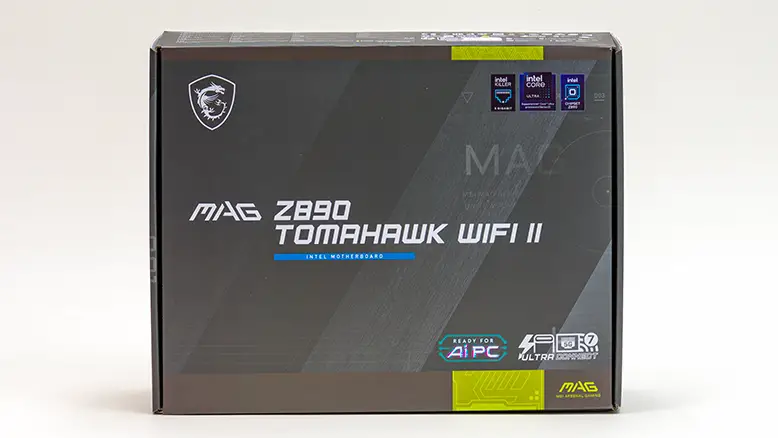
It was not that long ago that ‘entry level’ was synonymous with “barebones,” and if you got a decent VRM heatsink or two, you were well ahead of the curve. Those days are thankfully long, long in the past… and while we would love to see ASUS MudBrown colored PCBs make a comeback, the Modern Buyer demands more than just the ‘industrial look’. They want, need, and demand their entry-level motherboard to have a bit of personality. Even it is at the expense of MSRP inflation. This leaves many companies in a precarious position as suddenly, ‘good enough’ is no longer good enough. Thus, requiring a complete rework of their entry-level to mainstream motherboards “looks” just to keep up with the demands of their customers.

In this regard, MSI has started to dial things in nicely, but still has not perfected the TomaHawk-flavored “value+ formula”… yet. We say that as in the early days their TomaHawk, Mortar, and Edge TI looked like they were getting back from a paintball tournament that they lost… badly. With seemingly random splashes of color slapdashedly applied wherever the design team felt like. With the latest Z890 Tommy II, MSI is still stubbornly leaning into the whole ‘zombie’ color palette of the early to mid-teens… and still expects system builders to find a way to work neon green into a system build. Which we all do. Via the use of a rattle can of high-heat / engine block paint or a Paasche airbrush. Which admittedly takes only a couple of minutes to fix this… malfunction… but it is a quirk TomaHawk builders have learned to live with. Which no one should have to.

Bluntly stated, this is the weakest link of the TomaHawk. Sticking neon green on an all-black motherboard in the year of our lord two thousand and twenty-six is an eye twitching, violence-inciting, mortal sin. MSI would be much better off with further toning down the ‘personality’ and either opting for silver, white, or even black for their accents. All would be better than “zombie green”. Personally, we would recommend silver or dark gray paint, as that way it still has a bit of personality, but it would be a more mature personality. One that would lean into the fact that this motherboard does not come with onboard LEDs.
Either way, if you want a large Dragon to light up over the Rear I/O heatsink, or the model name to glow on the top M.2 heatsink, you will be disappointed. Instead, it relies upon neon green to burn your retinas and make you long for the boring old days of all black or all white… which is basically what ASUS does with their TuF and STRIX-A boards.

On the positive side, this is a motherboard that can indeed be a good to great foundation for an open case build… as it has six RGB headers. To be precise, this inexpensive board is rocking a 1+4+1 RGB header configuration. With backwards compatibility provided via a lone RGB (v1) header and the sweet, sweet “JAF_2” header, which does double duty as a 4-pin fan header and can either be used with ARGB v2 LED kits or older RGB gen 1 kits. Thus giving this board either two gen 1 RGB headers + 4 ARGB (gen 2) headers or one old school RGB + five newboi ARGB gen 2 headers. Meaning this is a motherboard that can not only handle anything an entry-level build will demand… but power a veritable Lost Wages Strip style build. One that can be seen from the moon.

In that vein, the MSI has upgraded the location of the various RGB headers. Yes, most (3 of the 5) are still located at the bottom of the board, but one of the JARGB (Gen 2) headers is now pretty darn close to the CPU fan headers. That makes it easy to pull off tidy custom light shows on, say, an Arctic Liquid Freezer III that comes with A‑RGB‑enabled fans.

Better still, the JAF header is no longer just an afterthought like it was on earlier boards. So instead of being placed higgledy‑piggledy, it now gets some love and is centrally located on the edge of the board – right next to the ATX 24‑pin power connector.
This location may not be “perfect” for all scenarios, but it is flexible enough to now power front AIO fans, top‑mounted AIO fans, or even, in a pinch, side‑mounted AIO fans (think Corsair 7000D as a point of reference). Now that is an impressive list of sensibly located ARGB headers that will make life eons easier for even the novice, first‑time builder.
When compared to the 0 + 3 configuration, both the TuF Pro and Strix-A are using the TomaHawk, which is not just better, it is noticeably better. Noticeably better because Asus decided for you that older gen 1 headers are no longer needed. Which is a pity. Plenty of perfectly good devices are Gen 1 RGB-enabled, and this unilateral decision should rub you the wrong way. More features are almost indubitably better than fewer. Asus cannot even claim that they did it to provide most of their customers with more Gen 2 headers, as you only get three. Thus, the MSI Tomahawk punches well above its weight class in this critical (for the modern audience) area… and that is why professional builders put up with the neon green quirk.
Kinda-sorta. Sometimes… as looks is more than just about the lighting.
Both the TuF and STRIX-A lean heavily into the “more is more” philosophy when it comes to motherboard fascia… as both are nearly entirely covered in white(ish) material over a white(ish) PCB. With the TuF Pro’s going for a “ProArt on a Budget” / professionally oriented look to the motherboard, whereas the Strix is wooing the “PC Gaming” crowd. In this regard, the basic black of the TomaHawk is good and rather flexible. With that said, breaking up the M.2 heatsinks and Z890 chipset heatsinks into four separate units that 1) do not cover ‘edge to edge’ like the TuF / STRIX offer and 2) are not even all oriented in the same direction… creates a more disjointed looking motherboard that is never going to be as ‘clean’ looking as the competition. This is why when we pull all the heatsinks to cover up the neon green… we usually do a white paint job. A black PCB + white ‘sinks results in a superior final build aesthetics compared to pure black or pure white… and helps hide that the whole chipset is using E/W wave pattern and the rest are N/S oriented.

To be fair, this ‘issue’ only matters to most builders before the system is built. Once completed, most of the motherboard is going to be covered by a video card, and this rounding of corners does not really matter too much. It does, however, to professionals who are going for a premium-looking build… even for their budget-constrained clients. As such, except for pro-builders’ opinions, one could argue that the TomaHawk’s approach is more practical than the Asus philosophy. Specifically, why waste resources on making hidden parts good-looking when good enough looking is… good enough? We personally think that is being a touch too generous, as this multifaceted approach to heatsink design is dated. Especially when said sinks are not as big as the competition and thus do not even cool as well as said competition.

Which segues nicely into a closer look at those M.2 heatsinks. For some, the top-most/primary/lone PCIe 5.0 x4 M.2 2260/2280 heatsink is going to be a major disappointment when compared to the honkin’ huge alloy (and in the case of the STRIX heat-pipe backed) approach ASUS uses. This is because it is a low-profile “stealth” looking heatsink that prioritizes compatibility over performance. To be blunt, this is a heatsink that is barely adequate for PCIe 4.0 x4 devices and will cause thermal limiting if one pushes their PCIe 5.0-based ‘C’ drive hard.

On the positive side, at least it is easy to use as it is EZ-enabled. Both at the heatsink locking mechanism and M.2 locking mechanism level (more on that later in the review). But ASUS’s design (on both the TuF Pro and STRIX-A) just looks, acts, and feels more premium. As they should, as they are the more costly options.

This is an ongoing complaint we have with MSI’s primary heatsink design. A design which you will find on the TomaHawk, the Carbon, and even the ACE series… just with more or less advanced features baked into it. Thus, for some, this ~2.5oz heatsink is sub-optimal. Ironically, we do take M.2 performance very seriously, and this is a non-issue to us and our builds. We do not consider the ASUS/ASRock/GB/MSI and all the rest M.2 primary sink options ‘good enough’ for high-performance PCIe 5.0 x4 M.2 devices. Simply put, we would be very, very hesitant to use any of them on any M.2 drive that is pumping out 10 watts or more of heat. Instead, we yeet them in the box (in case we have to RMA the board) and use an aftermarket Tt “tower” style heatsink. Even on budget builds, this is one area we do not compromise on. You may feel differently and have different priorities than us. As such, the looks (and abilities) of the M.2 ‘sink may matter and may be a real-world weak link for covering your needs.
Moving on.

The middle and bottom M.2 slots are separate heatsinks with disparate designs and appearances. Ironically, both weigh about the same at about 2.5oz each… give or take a smidgen. However, the bottom-most one is covering two M.2 ports (one of which is an extended length 22110 capable slot), giving it a long, thin… and somewhat svelte appearance – similar to those found on an ASUS motherboard. Conversely, the middle only covers one M.2 drive but is noticeably wider, chunkier… and rather dated in appearance and abilities. We say that as it does not get the ‘EZ’ treatment, and rather requires two screws to manually secure it to the motherboard. Mix in the vastly different ‘wave’ appearance, and it is downright odd-looking.

To be fair, these days, the middle heatsink’s looks will not really matter all that much. In an era of 2.5 slot video cards being considered “small,” it and the equally oddball-looking Z890 chipset heatsink are also going to be covered by the video card. With that said, we do wish MSI would either opt to “trickle down” the Carbon’s combo M.2 and chipset heatsink or, at the very least, combine the second and third sink into one large one. The reasoning they have not is because they have opted for a much cleaner and useful triple PCIe x16 slot configuration, which is eons better looking than the big/small/big route ASUS has opted for.
We understand why MSI is hesitant to do a full rework of this area. The only two practical solutions are either to go with the “Project Zero” and reduce the number of usable PCIe x16 form-factor slots, or increase the MSRP to cover the new M.2 heatsink manufacturing costs. As such, while we do understand the practical reasoning for why they did not want to upgrade the look of these heatsinks, the fact remains the competition has moved on to a more cohesive, prettier, and higher-performance design. That is a combo that at some point (sooner rather than later) MSI will have to match lest they get left in the “value bin”.

In the meantime, if MSI is hesitant to upgrade the ‘sinks they could at least turn this negative into a positive by giving all three PCIe x16 slots the ‘Steel Armor’ treatment. As it stands, only the top-most, PCIe 5.0 x16 slot, gets this metal cladding. We understand why they did not. The bottom two ‘PCIe x16’ slots do not offer sixteen lanes of bandwidth and rather are PCIe 4.0 x4 slots… that are routed through the Z890 chipset. Not the CPU. Thus reducing confusion on which slot to use for your GPU. That is the theory, and we mostly agree with the reasoning… it does hurt the overall look of the board.

On the positive side, at least the MAG Tomahawk WiFi II comes with two rather good-looking VRM heatsinks. While they may not be connected to one another via a 6mm heat-pipe, like the Edge Ti, their oversized nature, combined with the CNC-machined fins, does give the TomaHawk a rather robust aesthetic. One that loudly proclaims its cooling abilities as being more than up to the task of handling any modern Core Ultra 200 CPU. Which is a good thing, as both the TuF and STRIX-A have equally aura-farming VRM heatsinks.

Also on the positive side is the fact that MSI made the practical decision to push the dual EPS headers out of the back corner and more towards the front of the board. This may sound like a step backwards to novices, but it makes cable management and cable routing eons easier. Especially if one is using a big top-mounted 280/420 AIO whose bigboi fans just love to chew on EPS cables. Color us impressed… as even the STRIX-A doesn’t get this value-added feature. Instead, it and the TUF have the dual EPS headers crammed into the itty bitty ‘standard location’ corner. Hopefully, this new location will trickle up to the more expensive MSI models in the future.
As you can see, the Tommy II is at a minor to moderate disadvantage in some areas but wildly exceeds the competition in others. As such, the calculus on which is “best” for a given build (from a looks maxing point of view) is somewhat straightforward. Do you like function over form? The 3-way PCIe X16 slot layout on the Tommy is superior to the form-over-function approach ASUS has taken. Do you prefer a “minimalist” look to the build? Pick the TuF. It is noticeably cleaner… if you can work white into the build. If not, the nearly all-black Tommy is the way to go. Do you like a lot of RGB and want a super clean look with as few wires as possible showing? The Tommy II is the one for you, as it has them liberally sprinkled all over the board. Do you want to use high-performance M.2 SSDs but don’t want to pony up for proper cooling? The Strix-A and its heat-pipe-based cooler is probably best for you… But even though it is not as good as a cheap Tt M.2 “tower” heatsink.
The very fact that this rather inexpensive motherboard can go toe to toe with a much more expensive STIRX and win in multiple areas is impressive. Now if they would just stop using neon green, it would be an even better position.