• About Us
  • Privacy Policy
  • Advertise With Us
  • Contact Us
Real Hardware Reviews
RHR
  • Home
  • Reviews
    • All Reviews
    • Accessories
    • Processors (CPU)
    • GPU
    • Mobile
    • Games & Software
    • Systems
    • Cases
    • Tablet & Laptops
    • Ram
    • Storage
    • Motherboards
  • News
  • Off Topic
    • How To
    • Cryptocurrencies
No Result
View All Result
Real Hardware Reviews
RHR
  • Home
  • Reviews
    • All Reviews
    • Accessories
    • Processors (CPU)
    • GPU
    • Mobile
    • Games & Software
    • Systems
    • Cases
    • Tablet & Laptops
    • Ram
    • Storage
    • Motherboards
  • News
  • Off Topic
    • How To
    • Cryptocurrencies
No Result
View All Result
Real Hardware Reviews
RHR
No Result
View All Result
ADVERTISEMENT
Home Reviews

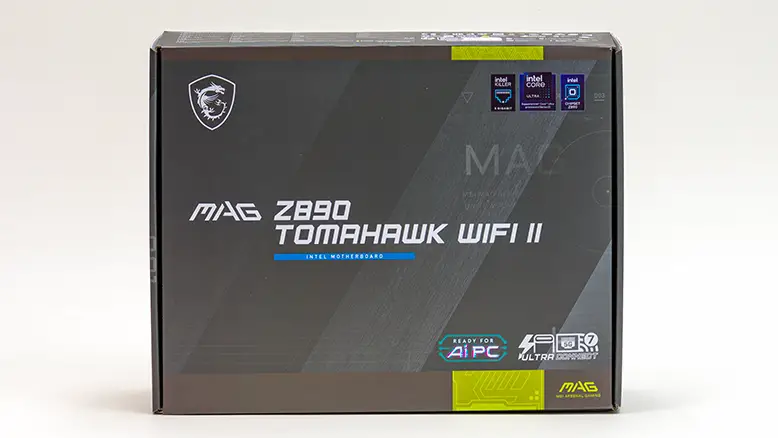
MSI MAG Z890 TomaHawk WiFi II Review

Proving That Low Cost Doesn't Have To Mean Low Quality

GaK_45 by GaK_45
April 27, 2026
in Reviews, Motherboards
MSI MAG Z890 TomaHawk WiFi II Review
Share on FacebookShare on Twitter
ADVERTISEMENT
ADVERTISEMENT
Jump to section

21. Closing Thoughts

  • 1. Introduction
  • 2. Specifications & Features
  • 3. Packaging & Accessories
  • 4. “Closer Look (Aesthetics)”
  • 5. Closer Look (Upper Half and Back)
  • 6. “Closer Look (Lower Half)”
  • 7. “Closer Look (I/O Features)”
  • 8. Test Bed & Testing Methodology
  • 9. Adobe Performance
  • 10. Blender & CineBench Results
  • 11. DaVinci & Handbrake
  • 12. POV-Ray & OpenSCAD
  • 13. SolidWorks & TrueCrypt
  • 14. winRAR & x264 HD
  • 15. AC:V & Borderlands 3
  • 16. CS: GO & Metro Exodus
  • 17. RDR2 & Tomb Raider
  • 18. Watch Dogs: Legion, Witcher 3
  • 19. BIOS and Overclocking Quirks
  • 20. Scorecard & Summary
  • 21. Closing Thoughts

Final Score: 88 out of 100

Before we begin, we must be completely upfront. We did not always like the Tomahawk.

During the early years, we saw them as the “poor man’s TuF”… a budget‑gamer board that tried, and usually failed, to live up to the Asus “TuF” and “Strix” options. To us, the MSI Tomahawk was a series that gave up too much to stay on this side of the thin red line that separates “value” from “mainstream” models. Even then, they still were not as cost‑effective as the MSI Pro series.

Since then, MSI and the Tomahawk have matured nicely. The TomaHawk is now one of the few rational choices left for entry-level builders. So yes. We have used, and will continue to use, a lot of “Tommys” in a lot of builds. That is our bias for using the best value options possible in our builds. Loudly and proudly.

To be clear, we do not use them to save a buck or two on the budget. For those builds where the budget is truly tight, we opt for the MSI Pro series – a series that is the epitome of the phrase “cheaper without being cheap“. So, no. It is not just about the asking price when we decide on a Tomahawk for a build. We use a Tommy variant in a lot of builds because they offer such sterling value. So much value that, for most builds, the Carbon boards are overkill. And while we prefer overkill to underkill in our builds, the Tomahawk usually gives you everything you need, most of what you want, and does both with a dash of style. Sometimes too much “style”… but usually enough in all three categories to satisfy Joe and Jane Sixpack. Mix in a good chunk of the Carbon’s ease of use, and the Tommy is blatantly built with the needs of real‑world users and system builders in mind. Or to mangle the soldiers’ poet: “For it’s Tommy this, an’ Tommy that, an’ Tommy go away! … but it’s Savior of a Budget when Mr. Murphy Comes to Play”

So yes, Tomahawks can sometimes be a little rough around the edges compared to the Asus, ASRock, or Gigabyte options… as they are no ‘Plaster Saints’. But when the drums begin to roll, you pick a Tommy. Not because it has a cool‑sounding name; not because it has a “cool” looking paint job or slick marketing. You pick a Tommy for its almost‑boring trustworthiness and reliability. Both of which are desperately needed in a market obsessed with stylistic bravado rather than steadfast reliability.

So, if you’re building a system but just can’t justify spending $450 CAD on just the motherboard, the MSI MAG Tomahawk Z890 WiFi II is one of the safest choices you can make. Yes, it may lack the name‑brand recognition of the “Taichi”, the “Strix”, or even the “AORUS” boards. Yes. It may lack some of the advanced features of its Edge and Carbon upper-class brethren. Yes. It certainly will never razzle-dazzle like an Ace Max (let alone GodLike)…, but it is a reliable workhorse. One that will give you a mighty firm foundation upon which to build a PC that can, and will, punch well above its weight class.

MSI MAG Z890 TomaHawk WiFi II Review 97

The Review

MSI MAG Z890 TomaHawk WiFi II

88% Score

Once dismissed as a budget compromise, the MSI Tomahawk has matured into an exceptionally reliable, high-value workhorse that prioritizes practical performance over flashy aesthetics. It remains a rational, "no-nonsense" choice for builders who need a steadfast foundation that consistently punches above its weight class without the premium price tag.


Review Breakdown

  • Packaging & Accessories 0%
  • Layout & Aesthetics 0%
  • Build Quality & Warranty 0%
  • Value 0%
Jump to section

21. Closing Thoughts

  • 1. Introduction
  • 2. Specifications & Features
  • 3. Packaging & Accessories
  • 4. “Closer Look (Aesthetics)”
  • 5. Closer Look (Upper Half and Back)
  • 6. “Closer Look (Lower Half)”
  • 7. “Closer Look (I/O Features)”
  • 8. Test Bed & Testing Methodology
  • 9. Adobe Performance
  • 10. Blender & CineBench Results
  • 11. DaVinci & Handbrake
  • 12. POV-Ray & OpenSCAD
  • 13. SolidWorks & TrueCrypt
  • 14. winRAR & x264 HD
  • 15. AC:V & Borderlands 3
  • 16. CS: GO & Metro Exodus
  • 17. RDR2 & Tomb Raider
  • 18. Watch Dogs: Legion, Witcher 3
  • 19. BIOS and Overclocking Quirks
  • 20. Scorecard & Summary
  • 21. Closing Thoughts
Page 21 of 21
Previous 123456789101112131415161718192021 Next
Tags: Budget PC BuildMotherboard ReviewMSI MAG Tomahawk Z890 WiFi IIMSI TomahawkPC BuildingPC HardwareZ890 Motherboard
ADVERTISEMENT
GaK_45

GaK_45

"Knowledgeable, opinionated and not afraid to ask the questions you can’t or won’t." GaK_45's combination of multiple industry certifications(MCSE, CCNA, various CompTIA, etc), and over twenty years' experience in the computer industry allows him to provide detailed analysis that is as trustworthy as it is practical.

Leave Comment

Recommended.

COMPUTEX 2016 Day 4 Highlights

COMPUTEX 2016 Day 4 Highlights

June 3, 2016
Intel Xeon 6 Processors Power Next-Gen AI and Network Infrastructure

Intel Xeon 6 Processors Power Next-Gen AI and Network Infrastructure

May 22, 2025
ADVERTISEMENT

Trending.

Arctic Liquid Freezer III PRO 360 Review

Arctic Liquid Freezer III PRO 360 Review

Arctic Liquid Freezer III Pro 420 Review

Arctic Liquid Freezer III Pro 420 Review

MSI BE6500 WiFi 7 USB Review

MSI BE6500 WiFi 7 USB Review

MSI Prestige 14 Flip AI+ 2026 Review

MSI Prestige 14 Flip AI+ 2026 Review

Seagate One Touch SSD 1TB Review

Seagate One Touch SSD 1TB Review

Real Hardware Reviews

© 2013 - 2024 | Powered by Real Hardware Reviews

Navigate Site

  • Home
  • About Us
  • Contact Us
  • Privacy Policy
  • Terms and Conditions
  • Editorial & Disclosure Policy

Follow Us

No Result
View All Result
  • Home
  • Reviews
    • All Reviews
    • Accessories
    • Processors (CPU)
    • GPU
    • Mobile
    • Games & Software
    • Systems
    • Cases
    • Tablet & Laptops
    • Ram
    • Storage
    • Motherboards
  • News
  • Off Topic
    • How To
    • Cryptocurrencies

© 2013 - 2024 | Powered by Real Hardware Reviews

This website uses cookies. By continuing to use this website you are giving consent to cookies being used. Visit our Privacy and Cookie Policy.