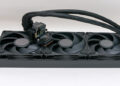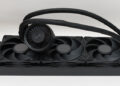
Circling back to the LCD and waterblock.

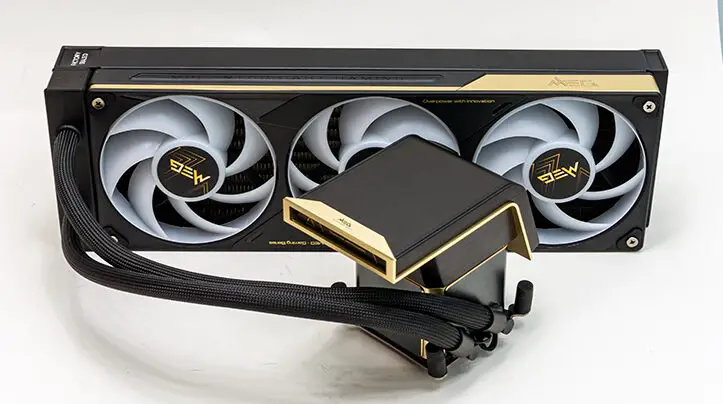
In many ways the waterblock is actually the more interesting of the two core components of the E15. We say this since all the electronics have been moved off the block and onto the radiator, it is actually rather svelte. With a mere ~8mm overhang, this block’s X and Y dimensions are (almost) solely dictated by the dimensions of modern CPUs’ Integrated Heat Spreader. That is rather unique, to say the least. However, since the LCD topper overhangs the entire block, this combo block+pump is much, much taller than it ‘needs’ to be… as it has to be a certain height (in this case ~65mm sans LCD topper… and another ~48mm for when the topper is installed) lest the LCD touch your RAM or motherboard.

In typical MSI fashion, they have not wasted this space and instead put all that internal room to good use. Namely spacing out the inlet and outlet route so as to decrease temperature cross-contamination. Increasing internal baffling so that the pump is nearly inaudible at most of its RPM range… and even at its full bore 3000RPM its rather quiet with only the flat metal fascia attached and basically silent if you use the LCD topper. Hell the pump itself also appears to be bigger than previous designs. All because MSI’s engineers had room. Room that, in today’s market obsessed with making things smaller this is a luxury that does pay dividends.

Make no mistake. Yes. This is a waterblock that is pretty much intended to be hidden by its oversized topper. That is not to say it is utilitarian in appearance. In fact, with its gold alloy accents, it is arguably the most attractive-looking AIO waterblock’s we have seen to date.

The only minor issue we have with it is that MSI did not figure out a way to carry over their “EZ Cap” that acts as fascia/covering for the socket hardware area. Instead, they opted for four small rubber covers that go over each integrated bolt… but do not do nearly as good a job at keeping things clean-looking. Especially when you opt out of using the LCD topper.

This minor issue is most likely because MSI engineers assume that the LCD topper will do the same thing, and few, if any, would opt for the flat top covering. Which is a shame, as you can still catch a glimpse of the socket area when this unit is fully installed, and a simple piece of “C” shaped plastic would have eliminated this nitpick.

In either case, the E15 does carry over the MIS Streamline cable technology, which hides all the cabling underneath the tubing’s sheaths. So even with the flat topper installed, it is a rather clean-looking CPU cooling solution when the block is mounted. Just not perfect like one would expect from a 6-bill model.

By gently prying the factory-installed metal topper off (and it is actually rather firmly held in place by four powerful magnets), you can see that MSI has opted for a pogo pin and pad arrangement for both data and power delivery. The upside to this is installing the LCD topper is quite literally a ‘snap’. The downside is you can only mount the LCD in two directions, E/W and W/E for Intel builds. Which is not the end of the world, but we would have liked to have seen a wee bit more flexibility with the luxury of using any of the four cardinal directions for the LCD screen orientation.

After all, there are some builds that we would have liked to have that LCD in a North / South orientation. Either to help hide some god-awful looking motherboard VRM heatsinks or to show off the DDR5 sticks without having to have the screen pointed “backwards” and facing the back of the motherboard… where it will cover the motherboard’s integrated rear I/O LED. Once again, a nitpick for certain… but on a 6-bill cooling solution there should be no issues, no nits, nothing but arguments in favor of busting your build’s budget. To be blunt, all that is the bare minimum, and it should solve issues that we did not even think were issues… and thus retroactively give other, less expensive, model nits to pick.

Which neatly segues in to the raison d’etre of the E15: the gorgeous AMOLED, 2K 6.67 inch wrap around LCD topper. Quite honestly, our first thought was not how to integrate it into a build but how to bodge it onto our cell phone, as this is a gorgeous piece of kit with insanely wide viewing angles and such deep dark blacks that have no business being on a frickin’ AIO waterblock!
Yet here we are with an LCD screen for an AIO that not only, in theory, can play 3D images and videos… but MSI actually gives you a bunch prepackaged for use “right out of the box”. Mix in the fact that you can easily make your own two to simultaneously play on the top and side “zones,” and it is your imagination, and overall build aesthetics, that is the new limiting factor.

Make no mistake. This is not just a pretty face, nor is the whole bendy-wendy screen nothing but a gimmick intended just for entertainment and marketing purposes. Instead, you can actually use it as a multi-zone screen, with the top portion being for, say, a video and the side (about 1/3rd of the total screen) for, say, displaying diagnostic data like CPU temp, GPU temp, and pretty much anything else you wish to use it for. Once again, with two independent zones that can also be used as one large zone, your vision of what it can do is the limiting factor. Not the tech MSI has baked into a cooling solution. Which is insane. We know many people who game on “2K” monitors with poorer specs than what this AIO comes with.

Before we move on to the installation section, we do feel it necessary to point out that this quad magnets and pad configuration is a lot more useful than just being an interface for an LCD topper. Powering and controlling an LCD screen is a high-bandwidth, high-power proposition… and as such, powering, say, a large 360 downdraft cooling fan “topper” would be a (pardon the pun) breeze. One that would be as easy to install as what Arctic uses… as they use magnets and contact pads in the ALF III. Yet at the same time outperforms the ALF III, which can not cover the M.2 port with its fan’s airflow.

As such, while MSI has limited the topper options to a solid chunk of metal covering and that LCD screen right now… nothing says that will be the case in the future. Possibly even more reasonably priced MSI models will get some trickle-down goodness. With possibly even inexpensive ‘MAG’ branded models being able to outperform the Arctic Liquid Freezer III’s 270’ish degree VRM cooling fan performance. Now that is how you lay the path for future generations to walk.

When taken as a whole, the E15 is a wonderful piece of kit in and of itself, but the promises of a better future are so stellar that MSI’s AIO division’s “future is so bright they have to wear shades”. Color us highly impressed with their new forward-facing vision for the AIO marketplace.