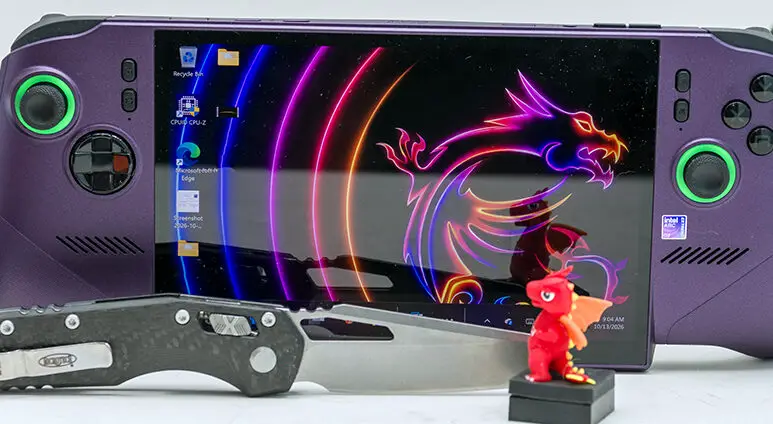

This nicely brings us to the FPS side of the screen equation and here MSI made a lot of good decisions. Not all, but a lot. 1920×1200 is not only eons easier (~3.6 times easier, to be more precise) to drive to buttery-smooth frame levels than 4K… but this TCL-made panel offers a Variable Refresh Rate range of 48 to 120MHz. In testing, all but the most demanding of ‘AAA’ games were silky smooth, as the integrated Intel Battlemage B390 is a portable gaming beast. Such a beast that even with modern ‘AAAA’ game optimizations being non-existent, it routinely was able to hit well above 48 FPS with little image tweaking required. With some games easily in the triple digits without any need for tweaking at all. Though, to be fair, most older games we tested typically were somewhere between needing a ‘little’ to a moderate amount due to Intel’s lack of depth on the driver front. As years go by, this sophomore weakness will fade away and become a truly non-issue.

That is the good. Good old Pythagoras’ Curse does, however, rear its ugly head in what is not being said by the screen’s paper specs. Yes, a 16:10 8-inch screen is basically a third of an inch taller than a comparable 16:9 8-incher (~4.24 vs ~3.92)… but it is also basically a full quarter inch narrower than a 16:9 8-inch screen (~6.97 vs ~6.78). For games, the added height matters more than added width. The same is true for most “real” applications like Word, Photoshop, Excel, e-mail apps, etc., where 16:10 is typically the superior format for data creation
The same is not true for video entertainment, old (poorly coded) games with no 1200P option, and ‘real’ applications such as DaVinci Resolve… YouTube/Morphe/FreeTube, Rumble, and other entertainment consumption applications.

In fact for video entertainment playback 16:10 means either anamorphic stretching or letter boxing is required… as the vast, vast majority is centered around 16:9. In real world terms this means if you use the new Claw for watching movies (and you easily can as at 14inches it is seemingly the same size as a 4K 65’inch TV at 10 feet away and the image will be vastly sharper on the CLAW than the TV) the results are a noticeably smaller image on the new Claw vs. what the paper specs would lead you to believe. On the positive side, the image may be smaller than ‘it should be’ but it will still be bigger than the Ally X20’s 7.4-inch screen by a hair, over 3/8ths of an inch (7.78 vs 7.4).

There are also two other issues one must be aware of with this screen. First is the fact it is not HDR compliant. Yes, it offers 500nits of peak output for a rather decently bright display. Yes, it offers 100percent sRGB… which is the same as saying it offers 100% Rec. 709 color gamut coverage. Which, in turn, is saying it covers everything the early aughts 1080p Blu-ray standard used. Which in turn means it is wider than what the even older 480P DVD Rec. 601 used. Which is a long way of saying it is not precisely bad. It is just underwhelming when the competition is rocking an OLED HDR + Dolby Vision (DoVi) screen tailor-made for modern content.

Content such as UHD Blu-ray-based videos, 4K streaming movies, and a wide host of other “content” where the pixel count does not matter nearly as much as the wider Rec. 2020 color palette used does. To be perfectly candid, most people never watch ‘UHD’ movies close enough to notice the pixel density increase “UHD” standards brought to the table. Instead, what everyone notices is the ‘wow’ factor the wider color gamut the ‘HDR’ standard uses added to movies (and let’s not even start thinking about how much better the per-scene custom brightness adjustments DoVi brought to the table is).
So yes. Color gamut is where this 8-inch screen fails to keep up with the competition. Put into cold hard numbers, sRGB only covers about 35.9% of the color range your eyes can see, whereas BT2020/Rec.2020 covers 75.8 percent. Even if MSI had opted for “just” a DCI-P3 compliant screen, that 53 to 54 percent color coverage would have been better. Arguably ‘good enough’ to not care about the lack of Dolby Vision, the competition is rocking.
MSI did not, because BOE (e.g. what Asus usually uses), Sammy (also what Asus alternatively uses), AU Opt’ (aka Taiwan’s “old reliable”), and even Innolux (aka Taiwan’s “value oriented option”) want an arm, a leg, and your firstborn for their touchscreen DCI-P3’ish panels… assuming they will even look at your RFQ in the first place.
So what does this noticeably narrow color gamut mean in the real world? It means that no matter what Windows 11 lies to you about this screen being HDR-compliant, it is not an HDR screen. Instead, the BattleMage B390 must waste watts doing real-time conversion of the color space so that you get a sRGB image that does not look like a hungover unicorn threw up on your fancy new CLAW.

Is this process energy expensive? Not really. For example, when removing all possible variables (e.g. using 1080P with ~20 Mbps bitrate, AV1, Opus w/ 960kb variable rate re-encoded version of the same audio stream, all in a .mkv container), the difference between the Blu-ray version of the Fast and the Furious 2001 movie and a 1080P recode of our UHD “25th anniversary edition” versions was only a couple watts. Yes, it occasionally peaked higher than that, but even best case vs. worst case was only a couple of watts.
In fact, this BattleMage variant does an admirable job at tweaking colors down to the older standard. Good Enough™ that most will not notice a difference… as colors may not be perfect but, for example, Letty’s 1999 Nissan Silvia S14 is shown closer to its canonical metallic purple (aka House of Color Purple Kandy) than the color-shifting deep metallic Burgundy / Kandy Burgundy (various day scenes) to Dark Plum Pearl / Passion Purple / Pavo Purple (various night scenes) it was wrongly, and randomly, color crushed down to in the 1080P versions. Not perfectly… as the B390 is working with a narrower color palette, but nevertheless well past ‘good enough’ to not be an immersion breaker.
So while this screen is not the perfect choice for MSI to have opted for, Intel comes to the rescue and transforms what on inferior systems would be a deal breaker into more of an annoyance. For most.

Sadly, this screen does have one other issue. Arguably an issue that many will consider to be a deal breaker. That issue is the screen glare. TCL is notorious for their glossy Anti-Glare coatings that are most accurately described as… “gentle”. So ‘‘gentle’’ they barely obfuscate indirect reflections… and as for direct reflections? Fuggedaboutit. You are going to notice them.
How much? That depends on how bright the video being played back is vs. how bright the reflection it has to overcome is… vs. your tolerance for random bright objects in your field of vision.

Bright reflections but low nits on the screen, say when reading a PDF manual, you can easily pick out minute details… of what is being reflected off the ‘anti-glare’ coating and into your eyeballs.

Moderate nits being pumped out in a moderate light environment? Not as noticeable.

However, even at 100 percent brightness, you may notice that you are instinctively tilting the screen to reduce/remove screen glare sources from time to time.
To be blunt, we can live with the weight of the Claw. We can even live with the non-HDR abilities of it. This issue? This is going to be a tough one to overcome. Especially given the asking price. Thankfully… screen protectors do exist, and this is not the first handheld computing device to suffer from such performance issues. Even Samsung and their AMOLED-based Tab S series suffer from it. So you can work around it. You just should not have to… as even TCL (as seen on their ‘NXTPAPER’ screens) offers better AG coatings than what MSI opted for. Making this an unforced error that you, the buyer, should not have to work around to get a satisfactory image out of the two-thousand-dollar gaming device. MSI needs to make the next Claw have a full-blown matte AG coating so as to remove this stain on their reputation. Now on to the testing stages!
Also, on the positive side, the TCL-made screen has two major things going for it.

First are the viewing angles… which are good to great.

Which should come as no surprise, as it is an IPS-based screen.

The other is the lack of glow. IPS sometimes have a lot of corner glow. The CLAW? Basically none.