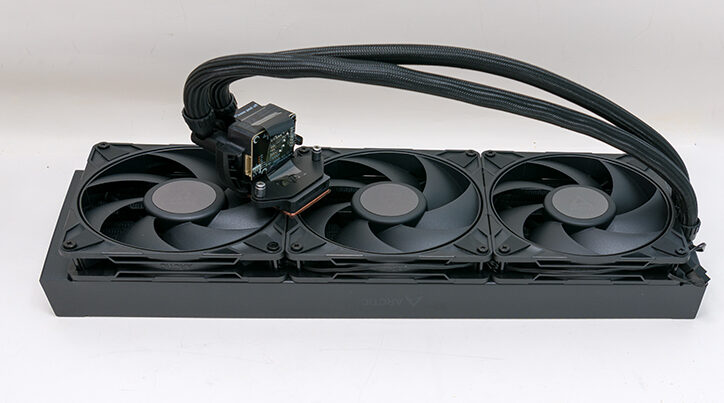

Unfortunately, Arctic is still resisting the inevitable and giving buyers what they want… the Pyramid Of Power on all the ALFs. While few will admit it, most ALF owners crave the ability to go up to the checkout with a box as ‘cool’ as the ALF 3 420s. Instead of that level of pom & pageantry, the arguably mainstream premium option (aka 3x120mm / 360-class of AIO) uses a shipping container that just differs in dimensions (and data on the box) from the smaller ALF 3 Pro models. Put another way, the name and colors may be different, but the Pro 360’s shipping container looks pretty much like every other AIO manufacturer’s 360-class box. That is kind of disappointing.

On the positive side if the shipping container design team must go the ‘boring’ route this is pretty much how to do things. Excellent iconography. Excellent pictography. A slick black with seafoam green color scheme?! There is no denying this is a premium-looking box. The only nit, besides the rectangular shape, is that we would like to see Arctic lean even more into the funky old-school color palette… and reverse them. Give us a seafoam green shipping container with black highlights instead of black with ‘green’ highlights. Then go one more and give the ALF 4 a British Racing Green makeover, then have the ALF 4 Pro rocking a Candy Apple Red or even having that Pro get the (Goat) “Hugger Orange” color palette. Put another way, embrace the analog era where personality was key… and woo ye old Boomers and us feral, Gen Xers with a speedball of nostalgia. After all, we, unlike zoomers and millennials, are the ones with enough money to legit buy a product just because of the color it came clad in (as our Toaster…and at one time… an impulsive 5th gen trash tier Cammy purchase can attest to). The very fact that this would ‘trick’ more buyers into buying top of the line kit would just be a nice bonus.
We bring this up as we must admit to being a wee bit disappointed when we did crack open the box and peek inside… as we were really, reeally, reeeeeally hoping that Arctic had once again broken with tradition and offered colors beyond White and Black. They did not, and we are extremely tempted to break out Ye Olde Paasche Airbrush to fix this crime against humanity. To be fair, this just underscores the insanely high levels of expectations that accompany any ALF upgrade. Especially one with (the first time ever we might add) ‘Pro’ added to the name.

Before we go there, first the included accessories. As with the 420 reviewed before, not much has changed with the list of included accessories. Same (controversial) lack of included installation instructions, with buyers expected to scan a QR code and get access to premium animated instructions. The same lack of a torque wrench that will keep you from nuking your Intel CPU socket. The same great TIM, but none pre-applied to the ‘block. Three good fans. A whole passel of cable options. Same great, if lacking in backwards compatibility, Intel and AMD installation hardware.

Basically, all the same complaints we and everyone else will have on just looking at the accessory. Thankfully, also like the ALF 3 Pro 420, the reality is that first impressions can be wrong, and the ALF 3 Pro series is a great example of this. Once you get beyond surface-level impressions, a lot of changes and tweaks have indeed been baked into the ALF 3 Pro cake.

However, before we do that, there is one thing we do want to point out: the TIM. Arctic is technically including MX6 in with the ALF 3 Pro series, but as they have recently released a MX-7 successor… at some point, your box will probably come with it. To be blunt, if MX6 were all we had to use we would not be unhappy with the situation. At all. It’s good, TIM. We just prefer to either opt for older MX4 which is eons easier to work with (more liquidly vs the MX6’s pasty consistency) or diamond based TIM (which is eons better than any non-conductive paste)… or use a HoneyWell pad (as we are lazy and pads are easier for scenarios where something is being installed, and uninstalled on a semi-regular basis). This new MX7 appears to take all the performance improvements baked into MX6 but with a consistency closer to MX4. In testing, it was noticeably easier to spread than MX6 and yet performed a smidgen better. Once again, we would not rush out and buy a 4-gram tube of it to use with an ALF 3… but we would use it over the MX6 if we had it on hand. Food for thought, at the very least, when it comes time to restock your TIM supply.
Let’s start with the hardware installation components. Yes. The same AMD and Intel socket support is all that you get. So older Intel socket generations are a non-starter. Yes. This is actually a good trade-off as Arctic includes one of the best replacement Intel contact frames going. So good that you will not go 3rd party. So good you will be mightily… annoyed if you plunked the cost of one of those “premium” brackets, as this free one is just as good, and just as robust, as those solutions.

We say this for two reasons. Firstly, it is free and yet … the integrated “offset” is now right for the new compute “tiles” location on the silicon. Sadly, we need to point this out as buyers actually need to care about if a CPU cooling solution uses the proper offset since both AMD and Intel started to not put the hottest components in the center of their Integrated Heat Sink and instead decided that it was a good idea to have the cooling manufactures fix their shi… err… laissez faire, laissez passer approach to component engineering.

The real reason we like this new frame so much is not that it will shave a degree or three off core temps; rather, it is that this new and improved replacement for Intel’s Reduced Pressure Intel Loading Mechanism (aka RP-ILM) … also happens to fix the largest problem with the ALF 3 design: M.2 heatsink blocking. Bluntly stated, Arctic’s design team did not respect the PCIe keep-out zones, and this, combined with only being able to mount the block (and its big inlet/outlet ports hanging off the side of said block), means many a builder was forced to choose between best-in-class cooling for their CPU or best-in-class cooling for their OS drive. Never a good idea to make buyers choose between those two options as there is no good answer.
With the ALF 3-Pro that all changes and now you can happily use the tallest of the tall M.2 heatsinks with your shiny new ALF 3 Pro… or at least you can if you are installing it on a Core 200 (or later LGA 1800 socket) based system. Older 13 and 14th gen with its not included contact frame and its further “south” offset? No difference between the Pro and non-Pro series. Rocking an uber AMD rig? No change as all but the LGA1800 users are SOL and will have to wait for a future revision before they get the same kind of love Intel’s “Core” series is getting. Which is a shame.

Sadly, it is a “game changer”… but this contact frame is also extremely finicky when it comes to installation. Intel never designed its ILM to be an end-user replaceable component. As such it can be considered “finicky” as one needs to torque to a very narrow range to a nominal 0.88Nm. Which almost no one will be able to hit freehand once… let alone hit for times in row.
This is once again a pet peeve of ours, as a cheap plastic ‘click’ torque tool should come standard with any device that requires you to yeet the bog standard Intel contact frame and use their proprietary one. Thankfully, you can pick up a cheap torque meter/wrench for not that much more than a mediocre meal.
On the positive side, Arctic has improved the rest of the installation hardware. For instance, the ‘bow’ built into the waterblock itself is not nearly as big a PITA as the original ALF 3 was. Don’t get it twisted, it still is an annoying design, but it is better. Better enough that this one tweak is actually worth the cost differences between any on sale (EOL) ALF 3 vs the new ALF 3 Pro.