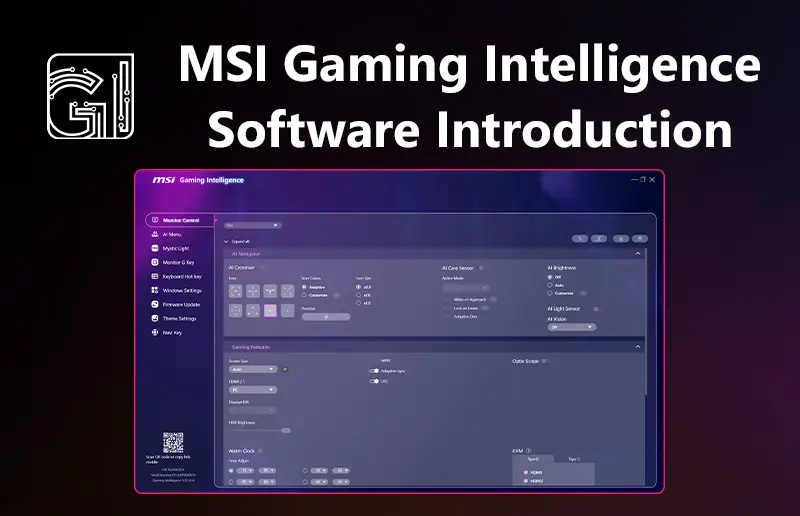
MSI has introduced Gaming Intelligence, a software tool that lets users control many of their gaming monitor’s settings directly from their PC. Instead of navigating the small on-screen menus built into the display, compatible MSI monitors can be adjusted through a desktop interface using a mouse and keyboard.
Once connected via USB, Gaming Intelligence allows users to tweak common settings such as brightness, contrast, color profiles, and input sources. The software also supports quick switching between display presets, which can be useful when moving between different games or types of content.
The platform also includes several gaming-focused features. Smart Crosshair automatically changes its color to stay visible against different backgrounds, while Night Vision brightens darker parts of a scene to make enemies easier to spot. There’s also Optix Scope, a zoom feature designed to help improve aiming precision in certain games.
For multitasking setups, Gaming Intelligence supports Picture-in-Picture (PiP) and Picture-by-Picture (PbP) modes, allowing multiple video sources to be displayed on the same monitor.
The software also handles firmware updates and works alongside features found on many MSI monitors, including KVM switching for controlling multiple devices with one keyboard and mouse.
Gaming Intelligence is available for a range of MSI gaming monitors and is designed to make it easier for users to access the extra features built into modern displays.
For more information, please refer to the MSI blog post here: https://ca.msi.com/blog/msi-gaming-intelligence-software-introduction
To download the software, visit here: https://www.msi.com/support/technical_details/MNT_SW_MSI_Preloaded_Software#txt01