• About Us
  • Privacy Policy
  • Advertise With Us
  • Contact Us
Real Hardware Reviews
RHR
  • Home
  • Reviews
    • All Reviews
    • Accessories
    • Processors (CPU)
    • GPU
    • Mobile
    • Games & Software
    • Systems
    • Cases
    • Tablet & Laptops
    • Ram
    • Storage
    • Motherboards
  • News
  • Off Topic
    • How To
    • Cryptocurrencies
No Result
View All Result
Real Hardware Reviews
RHR
  • Home
  • Reviews
    • All Reviews
    • Accessories
    • Processors (CPU)
    • GPU
    • Mobile
    • Games & Software
    • Systems
    • Cases
    • Tablet & Laptops
    • Ram
    • Storage
    • Motherboards
  • News
  • Off Topic
    • How To
    • Cryptocurrencies
No Result
View All Result
Real Hardware Reviews
RHR
No Result
View All Result
ADVERTISEMENT
Home Reviews

ZenBook Duo 2026 Review

Intel sneaks a lil' Celestial into their Mobile 300-Series.

GaK_45 by GaK_45
February 10, 2026
in Tablet & Laptops, Reviews
ZenBook Duo 2026 Review
Share on FacebookShare on Twitter
ADVERTISEMENT
Jump to section

8. Closer Look at Asus ZenBook Duo P.3

  • 1. Introduction
  • 2. Closer Look at Panther Lake p.1 (Cougar Cove)
  • 3. Closer Look at Panther Lake p.2 (Cougar Cove Cont’d)
  • 4. Closer Look at Panther Lake p.3 (NPU/AI/IMC)
  • 5. Closer Look at Panther Lake p.4 (DarkMont & BattleMage)
  • 6. Closer Look at Asus ZenBook Duo P.1
  • 7. Closer Look at Asus ZenBook Duo P.2
  • 8. Closer Look at Asus ZenBook Duo P.3
  • 9. Closer Look at Asus ZenBook Duo P.4
  • 10. Closer Look at Asus ZenBook Duo P.5
  • 11. Closer Look at Asus ZenBook Duo P.6
  • 12. Adobe Performance
  • 13. Blender & CineBench Results
  • 14. DaVinci & OpenSCAD
  • 15. Handbrake 265 & PSY-Handbrake AV1
  • 16. SolidWorks & PCMark
  • 17. winRAR & x264 HD
  • 18. Borderlands 3 & CyperPunk 2077
  • 19. Closing Thoughts

ZenBook Duo 2026 Review 33

ADVERTISEMENT

As an added bonus to it being smaller, the ZenBook Duo is now even easier to fit inside the typical laptop bag. Leaving more room for goodies like an external storage device and/or mechanical keyboard and/or trackball/mouse/Wacom tablet/etc. To be fair, this is one of the few laptops we would not be in a hurry to add in a mechanical keyboard to our portable setup. Yes. Unlike most, this ultra-portable class laptop not only includes two Type-C ports but a full-blown Type-A port, so adding a mech keyboard is simplicity itself… but you really should not be in a hurry to do so without at least trying out the included wireless keyboard.

ZenBook Duo 2026 Review 34

The reason for this is simple: unlike 99.999 out of 100 laptos the ZenBook Duo 2026’s included keyboard is actually good. Surprisingly good even. Short-throw, soft, and easy on the fingers keycaps. Nice spacing. Good size. All of which you should demand from a laptop’s keyboard, and many of these days to provide. However, what separates it from the vast majority of laptop keyboards is that it can do something most others don’t: it doesn’t flex worth a darn! This lack of flexing is why you will probably want to try it before replacing it… as it is that mushy flexing of the entire keyboard during typing that ruins the entire experience for most people. This keyboard does not do that as it is not just hanging over an opening in the chassis and acting as the internals’ topper. Instead, it is fully supported by either the bottom screen or the desk you place it upon. This difference is so huge that it is indescribably better. So better if we buy this laptop just to get this one feature.

ZenBook Duo 2026 Review 35

Of course, if you don’t like it, you can swap in a mechanical and get an even better user experience (especially if you hate short-throw rubber dome keyboards… like this one and its ~1.4mm full travel distance), but it is rather nice. Which is a good thing as it is a necessary “accessory”. Necessary in that it is the easiest/fastest way to turn off or on the secondary ‘bottom’ screen. Thankfully, it is using hidden magnets to auto-align and ‘snap’ the keyboard in place. Meaning you really don’t have to think about it. Get it close, and it will lock in and secure itself. First time. Every time.

ZenBook Duo 2026 Review 36

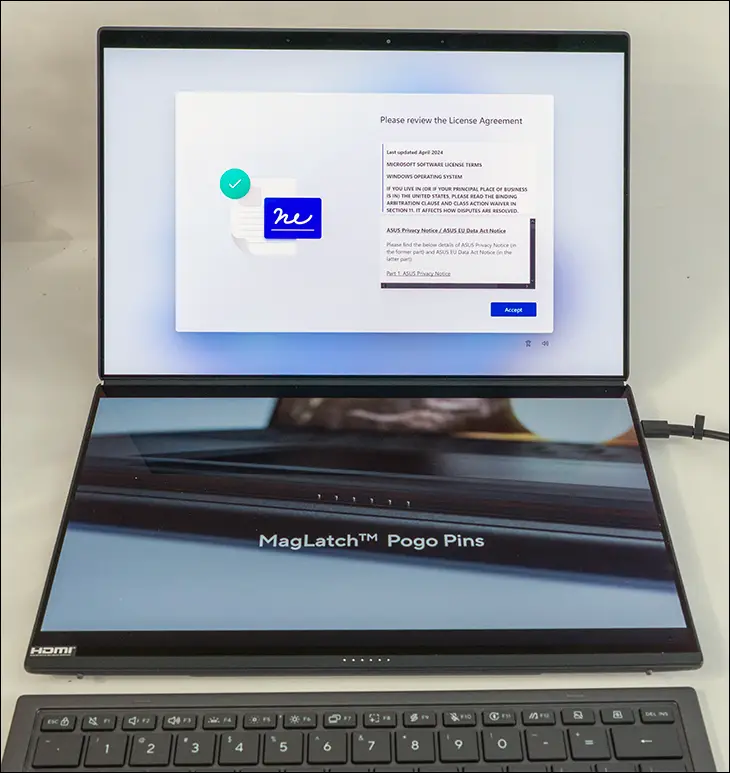
Of course, as it is a wireless accessory, it does use and require battery charging. This is why you will find both an on/off switch and a Type-C (sadly, charging only) port on the keyboard itself. However, while you can charge it externally via USB (and a not included wall wort) you don’t have to charge it while it is attached to the laptop. Instead, it also has pogo pins that, when it is in place (and the ZenBook Duo is converted into a ZenBook… Uno), the laptop not only knows to turn off the secondary screen but trickle charge the keyboard’s battery. Meaning you don’t have to purposely change the keyboard all that often. In fact, the internal battery will give you days of usage and as long as you occasionally use the it in Uno mode, it’s not something you even have to think about.

ZenBook Duo 2026 Review 37

Before we move on, we do have to mention the integrated touchpad on this keyboard. Yes. It is ironic that a dual-touchscreen laptop also comes with a tertiary Asus ‘ErgoSense’ touchpad baked into its keyboard. But to be blunt, your grubby fingers should not be poking the screen when you are working. They should be next to the keys so you can do most of the heavy lifting via this 127 mm x 79 mm (about 5 inches wide and a bit over 3 inches tall in non-French units). Which you will do… as while the screen is slick and extremely easy to use as an oversized tablet, the integrated touchpad on this keyboard is fantastic. Still not good enough to make you want to use it instead of an external trackball + 3DConnection Spacemouse Enterprise combo for CAD/CAM work, nor get pros to give up their Speed Editor for video work… but good enough that many will prefer it over a mouse in more general-purpose scenarios.

Taken as a whole, this keyboard is easily one of the best stock laptop keyboards on the market. Needless to say, we think it more than justifies its chonky 10.2oz weight penalty.


Jump to section

8. Closer Look at Asus ZenBook Duo P.3

  • 1. Introduction
  • 2. Closer Look at Panther Lake p.1 (Cougar Cove)
  • 3. Closer Look at Panther Lake p.2 (Cougar Cove Cont’d)
  • 4. Closer Look at Panther Lake p.3 (NPU/AI/IMC)
  • 5. Closer Look at Panther Lake p.4 (DarkMont & BattleMage)
  • 6. Closer Look at Asus ZenBook Duo P.1
  • 7. Closer Look at Asus ZenBook Duo P.2
  • 8. Closer Look at Asus ZenBook Duo P.3
  • 9. Closer Look at Asus ZenBook Duo P.4
  • 10. Closer Look at Asus ZenBook Duo P.5
  • 11. Closer Look at Asus ZenBook Duo P.6
  • 12. Adobe Performance
  • 13. Blender & CineBench Results
  • 14. DaVinci & OpenSCAD
  • 15. Handbrake 265 & PSY-Handbrake AV1
  • 16. SolidWorks & PCMark
  • 17. winRAR & x264 HD
  • 18. Borderlands 3 & CyperPunk 2077
  • 19. Closing Thoughts
Page 8 of 19
Previous 12345678910111213141516171819 Next
Tags: ASUS Zenbook Duo 2026Battlemage iGPUCore Ultra Series 3Dual-Screen LaptopIntel 18A NodeIntel Arc B390Intel Core Ultra 9 388HIntel Panther LakeUX8407 ReviewXe3 Graphics
ADVERTISEMENT
GaK_45

GaK_45

"Knowledgeable, opinionated and not afraid to ask the questions you can’t or won’t." GaK_45's combination of multiple industry certifications(MCSE, CCNA, various CompTIA, etc), and over twenty years' experience in the computer industry allows him to provide detailed analysis that is as trustworthy as it is practical.

Leave Comment

Recommended.

Silicon Power XPower AirCool DDR4-3200

Silicon Power XPower AirCool DDR4-3200

Intel Limited Edition i7 8086K Review

Intel Limited Edition i7 8086K Review

ADVERTISEMENT

Trending.

MSI BE6500 WiFi 7 USB Review

MSI BE6500 WiFi 7 USB Review

Seagate Exos X24 Review

Seagate Exos X24 Review

Crucial Pro DDR5-5600 128GB Review

Crucial Pro DDR5-5600 128GB Review

MSI MPG X870E Carbon WiFi Review

MSI MPG X870E Carbon WiFi Review

Seagate Exos X18 Review

Seagate Exos X18 Review

Real Hardware Reviews

© 2013 - 2024 | Powered by Real Hardware Reviews

Navigate Site

  • Home
  • About Us
  • Contact Us
  • Privacy Policy
  • Terms and Conditions
  • Editorial & Disclosure Policy

Follow Us

No Result
View All Result
  • Home
  • Reviews
    • All Reviews
    • Accessories
    • Processors (CPU)
    • GPU
    • Mobile
    • Games & Software
    • Systems
    • Cases
    • Tablet & Laptops
    • Ram
    • Storage
    • Motherboards
  • News
  • Off Topic
    • How To
    • Cryptocurrencies

© 2013 - 2024 | Powered by Real Hardware Reviews

This website uses cookies. By continuing to use this website you are giving consent to cookies being used. Visit our Privacy and Cookie Policy.