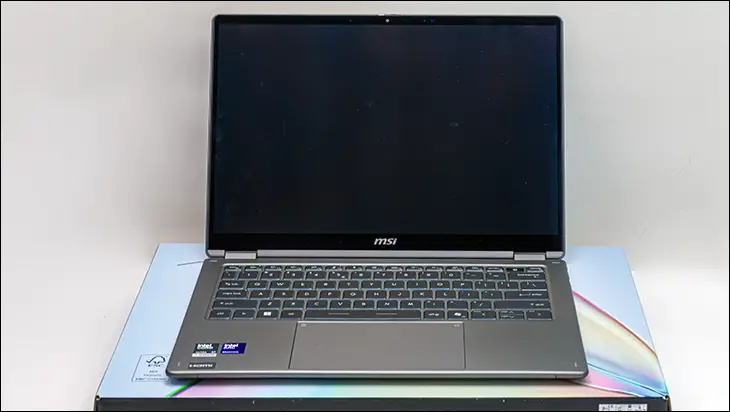

Also in the less-than-optimal category is the fact that MSI has followed the same underwhelming path that most other Intel 300-series laptops are treading. To be precise… a combination of soldiered RAM ICs and not enough of them. In this instance, and just like the ZenBook Duo, the base X7 comes with just 32GB of onboard DDR5X. Unlike Asus, which at least had the good grace to make it 9600, these 4GB RAM ICs are DDR5x-8600. Meaning that not only is this a laptop that needs at least 8GB (and preferably 16GB) for the iGPU… and is running the very definition of “bloatware” (Windows 11)… the actual RAM is also a bit on the slow side for this generation.

That… that is not a good thing. Yes. Most will not notice the frequency differences in the real world, but a professional-oriented series should come with enough RAM to get work done. As such, we would strongly suggest taking some of the savings with the Prestige series and skipping the 32GB options entirely and going straight to the 64GB options. As that is what all business-oriented, “every wo/man” model, laptops should come with in 2026.

Moving on, and on the positive side, MSI really went out of their way to include more than average amounts of external connector options. This gen, we are basically seeing 2 Type C + 1 Type A + a full-size HDMI port + 1 combo 1/8th TRS port as the de facto standard for connectivity options. MSI does include all that but then gives you another Type-A port. Meaning you can connect a keyboard, a mouse, an external storage device, a monitor, and a Wacom tablet (or USB to Ethernet Adapter). All without resorting to a ‘Docking Station”. Turning what is on first bluish a minor improvement into a notice value-added feature for business users. So much so, this should be the de facto standard for this generation. Making MSI the trend setters on how to do things right.

With that said, there is one nit-pick we must point out. That is MSI has gone for a Left/Right layout for the USB ports. With all USB Type-C on one side, and all the Type- A on the other. Meaning you can only plug in the ‘charger’ on the left side of the Prestige 14 Flip AI+. Neither side is the ‘standard’ layout for this generation. A minor inconvenience to be sure, but we would be remiss if we didn’t point out this annoyance.

Firmly in the win column, MSI has opted for the premium Intel WiFi 7 controller variant. While others stick to the standard (and very good in its own right) Intel BE211 variants, MSI opted for the more expensive Killer NIC option. So while the hardware controller and features are the same (WiFi 7 R2 + Bluetooth 6)… the software stack has access to much more advanced features. Features that Killer used to charge a premium for before they were Borged into Team Blue. Given the rather frugal nature of this business-class laptop, that is a nice little value-added feature we were not expecting to see.

While not quite as impressive as the WiFi upgrade, MSI has also made great strides in the sound their Prestige laptops offer. To be precise, they are now using a 2+2 stereo configuration. One consisting of both a dedicated (2-watt) woofer for the low end and a 2-watt driver for the mid+high end. On paper, this is not as impressive as the 3+2 configuration ASUS has opted for on their ZenBook… but unless you are a bass head, a single 2-watt driver for the mid+highs is a 2-watt single driver for mid+highs. Put bluntly, the vast majority of people will not notice a difference, and some may prefer the more… toned down bass of the MSI. Which makes sense as this is first and foremost a business-class laptop. Not a prosumer laptop boasting of rocking a sound system that has been optimized for the “Harmon Kardon Experience” (aka bloated and a bit distorted on both the lows and highs).

Sadly, the CODEC (aka soundcard/sound controller) is a smidgen underpowered compared to some. If one so chooses to dig through .inf files (as it is hidden behind “SoundWire” nomenclature), this bad boy is rocking a RealTek ALC1320. To be precise, it is the RealTek ALC1320 SoundWire Ultrasound Smart Audio variant with integrated amps. This is a very good choice, but as it is using integrated IC’s, it is a step down from laptops using an external opamp configuration. Once again, for most buyers (especially the intended customer base) the differences are going to be subtle. So subtle many will not care… and those that do will already be using an external DAC and circumventing the onboard audio altogether. Thus making this a corner that not only can… but arguably should be rounded. Just as MSI has done.

Also on the positive side, this business laptop is making use of a 3-way microphone array. One that is backstopped by fairly advanced “AI” audio processing so as to allow for as crystal clear a recording as inhumanly possible. In testing, it works rather well and hits far, far above its weight class… or to put it another way MSI’s design team prioritized what will be most important, and impactful, to the targeted demographics while not overtly “rounding” corners elsewhere. Color us impressed.