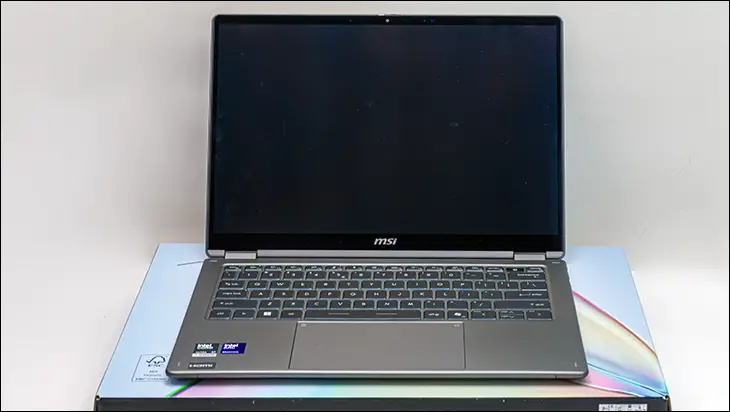

This is a laptop where it is actually hard to decide on which feature to go over first… as it has a surprisingly large amount of good features baked in. This is a good problem to have, and in nearly every corner of this design, MSI has really knocked it out of the park. So much so, you can tell that MSI focused on the wants, needs, and desires of the typical business user and then went about giving it all to them.

Take, for instance, the chassis. In previous generations, MSIs were more concerned with weight than they were with robustness… forgetting that business users are downright rough on their company-supplied hardware. Furthermore, while the chances were slim, the previous chassis really did not instill confidence as it was… overly flexible. Yes. Laptop chassis should be able to shrug off a life’s dents and dings, but they should not bend and twist as easily as the previous Prestige models did. This new gen offers both light weight (just a hair over 3lbs) and robustness. It still is a bit too flexible for our personal tastes, but that is par for the course with nearly all ultra-portables these days. Put another way, it is not a laptop you will pick up and instantly be afraid of breaking. Instead, it exudes a certain sense of professionalism that previous generations were sadly lacking. Just don’t expect it to stop incoming fire like some movie “pocket protector” trope… instead, if you suddenly realize you took the wrong contract, stick a SAPI plate in the carrying case like a normal person.

This new duality of lightness and strength is because the chassis is no longer using el’ cheapo “magnesium alloy”. Instead, this is an all-aluminum (best guess based on feel is 6063 and the second is 6061) chassis that is not poured and rather is CNC milled from a solid billet. Mix in a decent Type II (not Type III, as the depth of Type III would make it weaker and more prone to cracking) anodization, and it may not be as “space age”, nor purdy, nor as robust as the ZenBook Duo and is profitonium chassis… it is, however, more than just good enough. It is firmly in the ‘good’ end of the spectrum. Color us impressed for MSI and their quick course correction.

With that said, we do wish MSI had taken the time to build in an M.2 port cover. Removing a couple of hex bolts is not the end of the world, but only if you have a set of hex head screwdrivers. Otherwise, it is a PITA procedure to access the M.2 port. Something you may indeed want to do so you can yeet and replace the included M.2 drive.

We say that as the included “Crucial 2500” is basically the OEM version of the Crucial P310 2280 model. A decent enough drive for secondary storage duties, but would not be our first choice as the OS drive. On the positive side, it is an easy endeavor to do. Furthermore, since the entirety of the bottom of the Prestige 14 Flip AI+ is one big (if thin) chunk of aluminum… it is as easy as picking up a heat pad to turn the base of this laptop into one big heat spreader for the M.2 drive. Allowing one a level of freedom of choice in their options that ASUS and its ZenBook cannot match.

As such, our recommendation is to stick a decent 5 to 7 watt NVMe M.2 drive in there, pick up a cheap heat pad… and enjoy a massive boost in overall system responsiveness.

Though, to be fair, this is something that you should not have to do. MSI should have gone with a slightly more expensive but more premium M.2 drive on their mainstream business-class laptop. They have not, and, as with the 65watt power adapter, this is a corner that has been blatantly cut to keep costs down. Not “rounded”. Cut.
Since we have the bottom off, this is a good time to go over two more features. The cooling and the battery.
First up, the battery. Even though the new 300 series sips power compared to the last gen (during typical usage scenarios) everyone is going above and beyond when it comes to battery capacity. So as not to be left in the dust, MSI has beefed up the battery to a rather good 81watt/hrs of capacity. This is technically less than what some ZenBooks are shipping with… but 81 watts is very good given the single-screen nature of this device. Especially since going any bigger would have pushed the Prestige 14 Flip 2026 edition right out of its ultraportable class and into the mainstream laptop category. Even then, MSI is slightly cheating by making it 1.37KG or a hair over 3pounds… with 3lb being the historic cutoff for this marketplace niche. Either way, we doubt many will complain about it being ‘only’ 81W/H… as this translates to about 15 real-world hours of usage. Real-world performance not in “eco” mode (aka CPU TPD limited to 15watts PL1, 20watts PL2… where you can expect 24+ hours of battery) but in balanced mode. The mode you want to be using allows the CPU to access a short-term boost / “PL1” that has been set to 64, with the long-term boost / PL2 set to a peppy 30watts “PL2”.

For those interested, the performance mode does not really net you much more beyond reduced battery life (about 20-25 percent). While it is true that PL1 is increased from 30 to 45 watts, the reality is not as cut and dry… nor anywhere close to 50% improvement as it appears to be. Short term PL2 is already maxed out in balanced mode (at 64W) and in real-world mixed scenario testing, balanced mode’s PL1 will net you a long-term power consumption of about 40watts / hour, whereas performance mode’s “50 percent higher” PL1 nets a long-term of about 50watts per hour. Depending on GPU load, what precisely is being crunched on the CPU… etc. etc. etc. Put another way, performance mode is fine and dandy for plugged-in / AC mode, where there is really no downside, but on battery, MSI has optimized their balanced mode (and AI Mode that resides kinda-sorta between the two) to the Nth degree. So much so that you are not really giving up on all that much performance, but are giving up a good chunk of battery life.

To be fair, some of this is optimization… but a good bit is from it being a case of the cooling potential being just that. Potential. Not real-world performance. What we mean by this is that ultra-portables are not usually limited by their PL1 setting, and rather their it is temperature spikes that cause CPU throttling. Usually, with most laptops’ integrated cooling solution quickly ramping up to 100% fan speed… and then being overwhelmed. On paper, MSI has gone above and beyond via a massive (for its class) “Vapor Chamber Cooler with Intra Flow Cooling for Ultra-Slim Chassis” that spreads heat multi-directionally compared to the more mundane heatpipes + fin array cooling solution most use. Which in turn allows this cooling array located under the two blower fans an easier time at transferring heat (as we are talking a teeny tiny Z axis limit) from the CPU/GPU to the air… which in turn gives the two blower fans an easier time at pushing the hot air out of the back of it via the ~4-inch-sized opening.

That is the theory, and while MSI mostly gets it right, in reality, the existing setup is not perfect… in its default configuration. Basically, MSI has over-optimized this cooling solution for ultra-low noise (think well below the typical 30dBa “noise floor”… at under 20dBa). Which means that you will get a noticeable hot spot on the back corner of the bottom of the Flip AI+ because the fans are not moving enough air. Don’t get it twisted. It does not get hot enough to burn unprotected skin… but certainly gets hot enough to be uncomfortable when used as a laptop.
On the surface, pardon the pun, this would negate nearly all benefits from using an advanced cooling solution. Thankfully, the reality is… complicated and a lot more nuanced. To solve most (but not entirely) of the problem, all an owner needs to do is tune the default (dual) fan profile to ramp up faster and be more aggressive in monitoring temperatures. That is it. Do that, and you will be fine for the vast majority of day-to-day business scenarios… and honestly, if you are constantly pushing your CPU to 100% for hours upon hours, why would you have it sitting in your lap in the first place? Stick it on the desk so its blowers can suck in an optimal amount of air without worry about your clothing/Cheetos/hair/etc. clogging the intake.

Sadly, MSI, for some strange reason, has once again not included anything in the BIOS for fan profile tweaking at the ‘hardware level’. Worse still, they have also removed their Cooling Wizard option from this laptop’s variant of MSI Control Center 5. Meaning it is not an instant software fix. Thankfully, this is not 2010, and there are a ton of third-party options that can negate most of this issue.
The operative word being ‘most’ and not ‘all’, as to fully fix it MSI would need to use even faster blower fans. Which in turn would create more noise. Which most people would be fine with. When they are at 100%, they are barely audible, leaving plenty of room for faster RPMs before they would hit noticeable, let alone ‘annoying’. MSI instead has opted for extremely low noise fans, and while “true silence” is a laudable goal… nearly silent is almost as good and a lot more flexible in the real world. As such, this is an ultraportable that thermally limits faster than it should… and whose chassis runs hotter than it should.