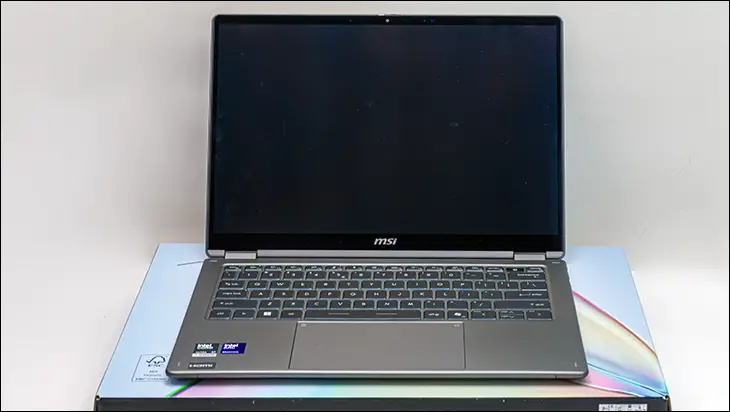

Most laptops are coming in shipping containers that are barely noteworthy. Even then, they are usually only noteworthy in how plain and boring they are. Almost as if the company is doing you a favor by including one in the first place. MSI, on the other hand, likes to do things differently. They know they are not entitled to your hard-earned cash, so when you do buy one of their products… they want you to feel special. That is why the 2026 edition of the Prestige 14 Flip comes in a box that is worth your time. Is worth your money. Is worth keeping. Bluntly stated, this is how you make a wonderful first impression.

This great first impression then gets further reinforced when you flip open the box and peak inside.

Accessories are broken down into two separate compartments – one for odds and ends and the other for the USB external power adapter.

A secondary layer of cardboard protector to help explain the features of the laptop. All culminating in the type of presentation that all laptops should strive for.

Which is both a good thing and a bad thing. As made mention already, it is good because it gives you a clear indication of the level of effort MSI has put into even their mid-range business-oriented laptops. Sadly, it is also a net negative because it sets one’s expectations rather high… too high for certain accessories that cannot live up to this elevated standard. To be precise, MSI includes a 65-watt USB Type-C power adapter. Not a 100watter. On a model meant for serious business users. Serious business users who are always on the go and time literally equates to money. On a laptop meant for serious business, who can’t afford a dead battery but are also willing to pay for 7-class products. As such, this needlessly extended charging time is a self-inflicted mistake that should have resulted in ‘retraining’ whoever first suggested this cost-cutting measure.

To be fair, given how inexpensive this laptop is a bit of leeway can and should be extended. After all, it is not a proprietary accessory (i.e., forcing you to buy the available MSI branded 100watter), and 100W USB Type-C GAN-based chargers are pretty much a dime a dozen these days. You may even have a drawer full of them already and consider this a nothingburger, which will cost you nothing. Either way, it is not a deal breaker, but it does mar the stellar first impression… and use up a lot of the goodwill you will have towards this particular laptop.

Thankfully, when it comes to the accessories, at least, that is the only major mistake. In fact, MSI (on most variants) includes their ‘Nano Pen’, which is a nice value-added feature. One that goes a long way to overcoming the whole costing cutting on the charger issue… as many (including Asus) don’t include one for free and rather expect you to poke the screen with your finger like a savage. The be precise, this “Nano Pen” is a multiple-button (including microphone-enabled voice search) e-Stylus that allows you to precisely move the cursor on the included touchscreen… without leaving grubby fingerprints all over said screen. Better still, it gives you pressure-sensitive feedback. Meaning it can, in a pinch, replace a Wacom tablet.

Also firmly in the ‘win’ column is this included accessory, which is powerful enough that it doesn’t even have to touch the screen to work. Instead, you can hold it about 1/3 to 1/2 of an inch off the screen and still be in full control of the pointer! Further, keeping your touchscreen pristine over the years… or at least as long as you don’t care about pressure-sensitive drawing with it, that is.

Even more impressive is that this stylus is not only charged via the laptop, but MSI baked in a hideaway storage slot in the bottom of the Prestige 14 Flip AI+. A latched slot where it is not only securely held during transportation, but (thanks to a contact pad setup) is automagically recharged during said downtime. The only minor nit worth pointing out is that the magnets used in this configuration can sometimes “flip” the pen so that the integrated charging pads are not in contact with the matching charging pogo pins. Meaning you can tuck it away… and come back in a couple of hours to a “surprise” in the form of a still dead stylus. Which is never ‘fun’… but thanks to fast charging 30 seconds will give you aboot an hour of use. Which certainly helps to take the sting out of things.

Though, to be fair, being able to store it without forcing it to charge can sometimes come in handy. For example, if you are leaving it for extended periods of time and don’t want it to drain the laptop battery, or just needlessly gobble up the nano pen’s battery recharging cycles. That, however, is reaching and looking for lemonade. Instead, MSI really should redesign it so that the latching mechanism can only fully engage if the pen is inserted correctly.