Intel Panther Lake 388H: 95%
MSI Prestige 14 Flip AI+: 88%
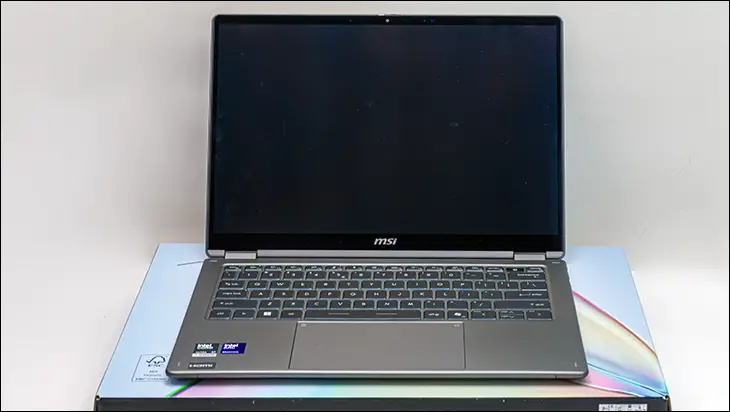
Let us start with the downsides of the new MSI Prestige 14 Flip AI+, as this is not a perfect laptop, and we do not want to give the impression that it is. First is the fact it comes with a 65 and not 100watt power adapter. This decision can, will, and does handicap charging to some extent; however, it probably will not matter to most buyers. For those, it does annoy… it still does not rise to the level of being a deal breaker. Instead, this is mainly a perception issue. One where most will perceive this move not as “trimming the fat” but as cutting corners. On a laptop that is part of MSI’s serious business class series, where buyers do not expect, nor tolerate, such blatant corner-cutting. As such, this issue will negatively impact both sales and buyers’ perception of the entire Prestige line-up. Thankfully, USB-C 100-watt adapters are plentiful, and given how much you save on the MSRP compared to most… this negative impact will not be overly dramatic. You just should not have to budget in the cost of a 100w adapter when buying any business-oriented 7-class laptop.
Nedt, we come to the biggest angry elephant of this particular model. There is no denying the fact that MSI has included an exceedingly advanced cooling solution. One that, on paper, is even more advanced than what ASUS is using on their significantly higher-priced ultraportable models. That… that should be a competition-killing value-added feature. The reality is, while it is very nice, the implementation and “out of the box experience” is not perfect. Namely, MSI has handicapped the cooling performance of that vapor chamber with an overly aggressive fan profile. One focused too much on silence and too little on cooling. Luckily, tweaking it is pretty much just a matter of a couple of seconds via 3rd party fan control software. However, one should not have to be on a Prestige laptop. A series which should come with a more… bespoke out-of-the-box experience. Furthermore, business users should not have to opt for 3rd party solutions as MSI’s usual fan profile tweaking app (aka “Cooling Wizard”) is very good… and yet has been purposely yanked from the laptop’s variant of MSI Center 5. This is not a good look for MSI, and it is once again another self-inflicted issue that could have been easily avoided.
Lastly. The screen. On paper 16:10 form-factor combined with a Sammy OLED screen that is also rocking variable refresh rate? That should be a match made in heaven. When one factors in the really good, arguably excellent by laptop standards, antiglare coating… on a sub 2,500 CanuckBuck ~3lb laptop?! That should be ‘shut up and take my money’ level value. Sadly, the world has moved on past WUXGA. These days, buyers demand “3K” resolutions as a bare minimum standard… even when “3K” does not make much sense and does not do much beyond increasing the MSRP. So while this is a gorgeous screen for its class, the fact remains that perception is reality when it comes to buyers’ tastes and choices. Thus, we strongly suggest that MSI opt for a 3K OLED screen on future business-oriented models… and avoid all the controversy that goes along with this oddball resolution.
Counteracting these three issues is the fact that this is an insanely powerful laptop. One that crushes both work and play tasks more like a 9-class laptop rather than the 5-class asking price would lead you to believe. Mix in the added connectivity options with a very, very good keyboard, and then lather in the fact that this is a laptop rocking an all-aluminum chassis… and the end result is a laptop that looks, feels, and acts like it should cost heck of a lot more than it does.
In that vein, and unlike the ZenBook Duo we recently reviewed, this is also a laptop that laughs at the idea of running on battery power for 12 hours straight. MSI may not have a 90+ watt battery baked in, but the combination of power sipping CPU+iGPU with a beefy boi 81W battery results in not hours but days of battery life. You can quite literally use this for 12 hours straight at work, take it home, and then use it to “Netflix and chill” all night without worry. Give it a couple of hours to recharge and you are good to go once again. Which is darn near a siren song for business users, University students, and pretty much everyone else who is looking for a very good, very flexible portable PC solution.
With all that said, and while this laptop is a winner in its own right and (probably) would have been regardless of the processor it was using, the true MVP is the Intel Core X7 358H that MSI opted for. We are not being hyperbolic when we firmly state that if you go Team Blue, this is the processor you want your new laptop to be using. It legitimately offers nearly all the power of the Core Ultra X9 388H, just without having to also worry about pesky things like a higher asking price and higher heat output. Thus, by fully embracing the abilities of this new Panther Cove processor, MSI has been able to create a potent yet surprisingly inexpensive laptop. One that proves buyers no longer need to spend a ton of money in order to gain access to (once premium) features such as durability, processing power, or even aesthetics. So while it may not be perfect… There is no denying that MSI have succeed at creating an excellent “all round” option. One with such great value that it all but demands to be on your short list for serious consideration. Doing otherwise would be doing yourself a great disservice.
Intel 358H:


MSI Prestige 14 Flip AI+:
The Review
MSI Prestige 14 Flip AI+
Gemini said Despite minor drawbacks like a lackluster power adapter, an aggressive silent fan profile, and a lower-resolution screen, the MSI Prestige 14 Flip AI+ stands out as a high-value powerhouse with an aluminum chassis and exceptional battery life. Driven by the efficient Intel Core Ultra 7 258V processor, it delivers premium performance and portability that far exceed its mid-range price point.