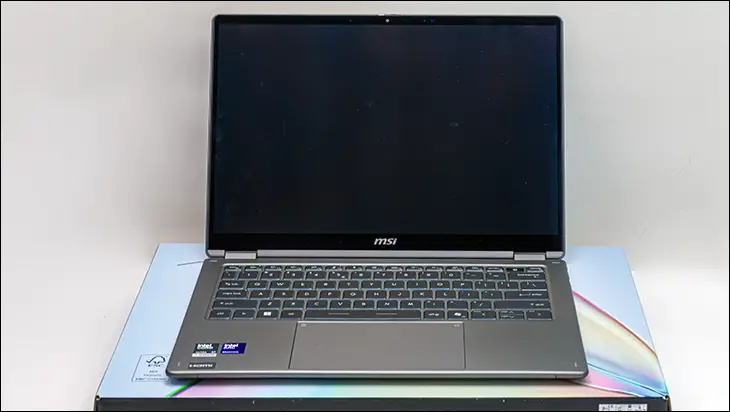

Moving on to the star of the show. Much like with the ZenBook Duo, a convertible laptop/tablet hybrid device lives and dies by the screen and the anti-glare coating the manufacturer has opted for. In the first part, we have a few issues with MSI opting for a Samsung OLED screen. It’s good. It offers blur-free, crystal clear images. It is rocking a fairly wide 48 to 120Hz Variable Refresh Rate so that even demanding games will typically be smooth. It is color accurate and offers the perfect color gamut and color gamma for business use (so that video and photo editors can adjust colors so that their work is both accurate and the right shade… with blacks being black and whites being white). It even comes in the correct (for business) 16:10 format. That is a lot to like.
Unfortunately, there is one teeny-tiny nitpick with it. It’s not a 4K resolution screen. It’s not even 3K. It’s WUXGA… aka “FHD+”… aka 1920×1200… aka “the other 2K”… aka the “widescreen” version of UXGA (1600×1200) from way back in the day. At typical distances, this lack of ‘3K’ resolution is logically a nothing burger. The reality is, while facts do not care about your feelings, you certainly do… and will feel like this resolution is an issue. Even though it probably is not, and you will not be able to tell the difference between a 14-inch “3K” (let alone 4K) monitor and a 14-inch WUXGA one.

I am sure that statement will get an eyebrow raise or three from the Starbucky crowd who have been conditioned by Cupertino to believe Retina is the only serious option… and that opinion has spilled over into the working end of the real-world. So before you send us a sternly worded email. Let’s first… math the math.
This screen has a very good ~162 pixels per inch density. A 14-inch “3K” like the one the ZenBook Duo is rocking has 242.6PPI. On the surface, that is about a 50percent pixel density increase. Which sounds massive, and it can be. Just not always, and the answer is ‘it depends’. The fact of the matter is Ye Oldde Mark 1 Mod 0 eyeball can only resolve things so small. The official name for this is Ocular Angular Resolution. Which has been studied extensively and boils down to about ~1 arcminute or 1/60th of a degree. Are the dots bigger than that number? You will see the individual dots. Are the dots smaller? It is a “smooth” image.
The threshold breaker for the distance at which this happens does vary from person to person, but the rule of thumb is this cross-over being aliased and smooth images is somewhere between 1.5–2x screen height… if you have 20/20 vision. Which is a little fuzzy-wuzzy for our liking. Good enough for rough and ready / Johnny on the spot math… but not precise enough if you have the time. So if you want to be more specific at the distance at which it ‘should’ make a differences the math is fairly easy.
If we assume ~1 arcminute is the threshold breaker (and it pretty much is considered as such for 20/20 vision), and 1 arcminute converted to radians is 3438… we can run the numbers. With a pixel subtending this angle when its size equals X distance divided by 3438….and we just have to solve for X. Shuffle that around, and we have X = 3438 / PPI.
For 162PPI screens of any size its 3438 divided by 162 or 21.2ish inches / 54ish cm.
For “3K” it’s 3438 / 243 or 14.1ish inches / 36cm.
Unless you are doing things you shouldn’t be doing (in public), most people will sit between 20 and 30 inches away from the screen while working. To be a bit more precise, the average viewing distance for the “average height” man (5ft 9) is ~26.3 inches, and for the “average woman” (5ft 4in) the viewing distance is about 23.2iches. So 162ppi is ‘fine’ and “good enough with a bit of wiggle room”. Not overkill like “3K” but most likely good enough.

That is the cold, hard math. That is the marketing buzzword bingo peeled away. If you are OCD, there is actually a bit of math you can do to see if it will work for you. Be warned, it takes a bit of effort. First, measure your length from the torso to the elbow. Call this “H”. Then, the length from your elbow to the tip of your middle finger. Call this “L”. The tilt angle most people use is typically 15 to 30 degrees. If you want to measure it… You should. We typically use 20degrees. You may not. Call this ‘A’.
So the math is H multiplied by L multiplied by sin(A).
For the average North American male of 5ft 9. They have H=10.5. L=11.8.
10.5*11.8*sin(20) giving 26.3inch distance.
For the typical white boy of 6ft, its H = 11. L = 12.2 and the sine of 20 for 27.4 inches
For the typical Shawty its 9.5*10.8*sine of 20 degrees for 23.2 inches.
Math the math for you, and you will know beyond a shadow of a doubt if you believe in fantasy or reality. MSI has already run the math, and for work, it is a screen that is both excellent and inexpensive. Which is precisely what managers who sign off on purchase orders like to see.
Outside of work… is where things potentially go off the rails for MSI. Potentially go off the rails in a very complicated way with a lot of personal preferences impacting reality. For PC gaming, the viewing distance is the same as the working distance (as you need your fingers over the WASD keys) or even further (if you use a controller). For these scenarios, you are still golden.
What about on the weekends when you are lazing around watching a movie… and acting like a hungry otter with the laptop balanced on your jelly belly? Here, the distance is going to be about 12 (women) to 18in (men)… and “3K” starts becoming important. To some, do you screen cast to your TV and don’t act like a savage? Doesn’t matter. It could be one PPI and still would be perfect. Want an all-in-one wonder device that you can use for Netflix/Rumble/YT/Twitch/etc. So you don’t have to eat only off-brand “Ramen” in your dorm for the next 4years? This is probably not the right model for you. Which is a shame, as this screen is good. So consider what you actually plan on using the laptop for before writing off the “low resolution” screen.

To be fair, a good chunk of why we like this is because MSI has also bestowed upon it an excellent Anti-Glare coating. So much so it out and out smokes ASUS’ ZenBook Duo and its 3K screens. So good that it is not even a competition. To be precise, when straight/front-on, you will not get any noticeable glare unless the light source is in a very narrow angle of reflection.

Off-axis? Eons better than ASUS. On a model that is also eons cheaper because it was designed with getting work done in the real world as its primary focus. Not marketing checkboxes and trying to woo the Corpo-tino buying crowd. To be candid, this AG coating underscores how much effort MSI is putting into their laptops these days. Which is a great way to make a lasting good impression. Color us highly, highly impressed.