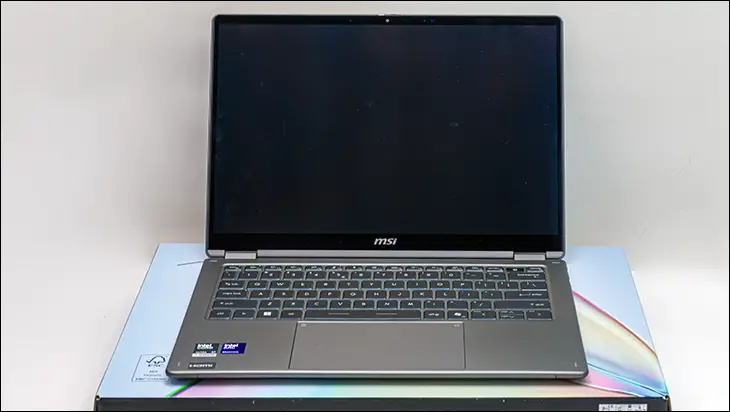

In this vein, what matters to professionals is the keyboard. Unlike the RAM issue here, we see nothing but good news. Surprisingly good even… as we are typically not fond lovers of laptop keyboards. They usually are horrible to type on due to their mushy, bouncy, flexy, and generally speaking, trash-grade “quality”. Put bluntly, most laptop keyboards are an afterthought that is mainly done so as to act as a cover for the internals. Not serious equipment meant for serious (and continuous) work. So, how is the MSI Prestige 14 Flip AI+ keyboard? It’s not trash. Not trash by a long shot. It will never be our favorite, as this is one area where ASUS and their removable Bluetooth-enabled ZenBook Duo is clearly superior – but by laptop standards, it is good. Decent feedback. Good backlighting. Good key spacing (by laptop “island” standards). Good feel with little “moosh” that mushroom dome switches are known for. Very little “bounce” and generally speaking, a fairly good keyboard that provides a well above average typing experience.

Some of this is because MSI has reinforced the underside of this non-removable keyboard, so a lot of the bouncy/flexy feeling typically associated with laptop keyboards has been nullified and negated. Some of this is because the keyboard itself is actually well designed. Once again, showing MSI put the time, effort, and budget into key areas that actually matter… now if they would only take a page from ASUS and make it removable, and we would truly be satisfied with the direction MSI is taking with their flagship business-oriented laptops.

Moving on… ish. The trackpad is also a key component of a business laptop, and once again, MSI has clearly put the work in on making it as good as possible. To be blunt, it is just as smooth, just as easy, and just as precise in its tracking as what ASUS is using on their much… much more expensive ZenBook line.

Mix in a generous size that can be used in a pinch as a Wacom tablet replacement, or even just during those times the stylus’s battery dies mid-work, and if you like trackpads, you will really like this one. Color us impressed.

This brings us to the two stars of the Prestige 14 Flip AI+ show. The screen and that sweet, sweet hinge configuration that attaches said screen to the rest of the laptop. Let’s start with the hinge. As the name suggests, this teeny tiny laptop is a convertible.

One where, if you so choose, can be… flipped so that it acts much like a tablet. A big tablet. A big, powerful tablet. A big, powerful tablet running a proper Operat… err… a big power tablet running an Operating System designed (by AI) for the Modern Audience.
On that note, you can run a legit proper Penguin flavored OS on it easier than you can the last-gen Windows OS. Just expect a few quirks, aka lack of drivers, for a couple of the advanced features. For security-oriented business users, that is probably worth an afternoon’s worth of time investment.

In the meantime, if one is forced to use Windows 11, the included Windows 11 image still allows for offline account creation via the simple “trick” (…that AI Engineers hate). At the WiFi screen, simply hold shift+f10. Then, in the CLI pop-up window, type in:
start ms-cxh:localonly.
Then, during installation. Not. Choose. USA or Canada. Choose International English (and say Ireland as your country) so that a little bit less spyware gets installed and more of it can be disabled(ish).
Then, after installation, run Win11Debloat (or our personal choice: Chris Titus Tech winUtil) and fully debloat it.

Tangents aside, when most people first see a convertible laptop, the first question is “Why?”… and the answer boils down to flexibility. Walking around a tech conference and want to do “on the spot” presentations? The Prestige 14 Flip AI+ will be eons easier than a standard laptop to carry and to use. For non-business scenarios… a certain “Blue” emulator will let you run Android apps with very, very few quirks while still giving you access to all the WinTel-only programs your business has come to rely on. Mix in the eventual SteamOS and abilities to emulate that entire library (on a more powerful device, we might add), and there are a lot of good arguments to be made for why a convertible does make the most sense.

The downside is that most convertibles come with absolute trash-tier hinges. So bad, they are better described as a dumpster of used baby diapers that has been set on fire. Some are so fragile that if you even look at the darn thing, you are probably going to break them. Others have friction coefficients so high that it takes effort just to adjust the screen’s angle. Others? So weak that the screen is flippity-floppity. Others? Since all the power and data cables have to run through them, they slowly but surely eat through the protective coating and kill the laptop. Usually just past the warranty period… almost as if they were designed that way.

The Prestige 14 Flip AI+ hinges “offer” none of that. These hinges are chonky all-aluminum 360-degree hinges, which add literally zero height, width, and depth to this design. They also smoothly move with just enough friction to keep the screen at the angle you set it. They also both protect the internal cabling from external threats… and themselves. Put bluntly, the Prestige 14 Flip AI+ is rocking a pair of hinges that we would trust… and make sure our convertible laptop had. It’s just that good a design when compared to the usual found in the marketplace.