
As we have stated in the past, both Team Red’s and Team Blue’s chipset engineering team(s) are seemingly doing their level best to confuse the general buying public… and have for many years now. Almost as if it is a competition between the two teams. For example, right now Intel Z890 is top dog in the Blue corner, while X870E (and its non‑E version) leads the way for Team Red. Before that, it was Z790 vs X670E. Before that… etc, etc., etc. For new builders, that is not exactly a warm and fuzzy welcoming into the hobby. We have lost count of how many times clients ask, “Why the 70 chipset instead of the 90?” – especially on no‑expense‑spared builds.
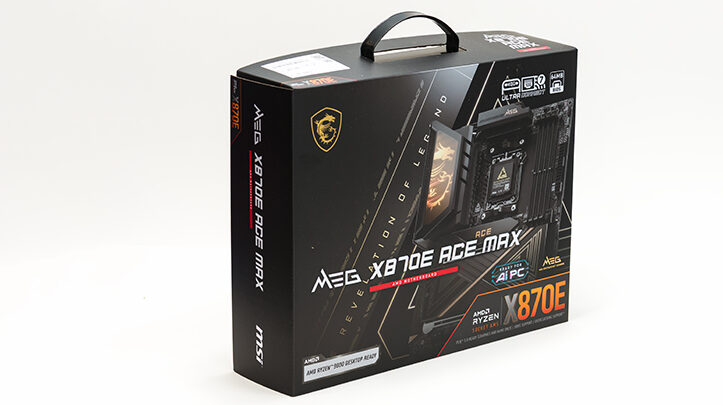
That is why we keep bringing up packaging – because it is more important than it looks. It’s the manufacturer’s last and best chance to get a message across before the product leaves the shelf. The box must do a lot: pull focus, deliver information, and do both before the buyer zones out. Over the past few years, MSI has dialed in exactly how to make their packaging work both harder and smarter at accomplishing these gargantuan tasks. So much so that their style has settled into what we’d call a blend of “classic conservative, with modern sensibility”… and the MEG X870E Ace Max (or just “Ace Max” as we are going to call it for brevity’s sake) fits that title perfectly. In fact, this is a great example of what a design team can do when given the freedom to do things right.

Gone is the pink accenting from last year’s AMD range. In its place is a cleaner mix of black, white, and red which is a combination that is bold enough to stand out yet refined enough to be taken serious. However, the detail that seals the deal for us is the phrase AMD Motherboard running directly beneath X870E. Smack dab in the center of the front panel. This little tweak not only clearly tells you it is for AMD, but it also underlines the chipset name. Thus making sure no one mistakes which platform it’s for and teaching novices the intricacies of AMD vs Intel chipset nomenclature. All in a clear, direct, and smartly done manner that does not feel condescending.

The same holds true for the internal protection. The motherboard sits in its own safe zone, surrounded by dense cardboard that acts as both structure and cushion. It is this kind of design that proves MSI knows exactly how rough warehouse handlers and Mr. Shipping Agent(s) can get. Put simply, short of someone drop‑kicking it off a truck and into a wood chipper, this box will keep its contents safe… or die trying.

The accessory kit carries the same thoughtful tone. Everything inside is useful, and nothing feels like filler. Manuals, quality “EZ” magnetic mounting antenna, cables, labels, driver USB – it’s all well organized and straight to the point.

With that said, the standout piece is the little EZ M.2 clip installation tool. At first glance, it looks like a cheap plastic throwaway accessory. The reality is it makes sense the first time you need to swap a broken clip without scratching your board… and thus don’t want to break out Ye Olde Overkill Hex Socket set. It is this kind of small, smart inclusion that shows someone on the design team was thinking beyond the spec and marketing sheet.
This is how you make a clean, confident, and thoroughly well‑executed first impression. Every element, from the outer box to the smallest accessory, feels intentional in execution as it is intentional. Intentionally designed by people who understand not just how hardware works, but how builders actually use it. And that, that is really the theme of the Ace Max in a nutshell.