• About Us
  • Privacy Policy
  • Advertise With Us
  • Contact Us
Real Hardware Reviews
RHR
  • Home
  • Reviews
    • All Reviews
    • Accessories
    • Processors (CPU)
    • GPU
    • Mobile
    • Games & Software
    • Systems
    • Cases
    • Tablet & Laptops
    • Ram
    • Storage
    • Motherboards
  • News
  • Off Topic
    • How To
    • Cryptocurrencies
No Result
View All Result
Real Hardware Reviews
RHR
  • Home
  • Reviews
    • All Reviews
    • Accessories
    • Processors (CPU)
    • GPU
    • Mobile
    • Games & Software
    • Systems
    • Cases
    • Tablet & Laptops
    • Ram
    • Storage
    • Motherboards
  • News
  • Off Topic
    • How To
    • Cryptocurrencies
No Result
View All Result
Real Hardware Reviews
RHR
No Result
View All Result
ADVERTISEMENT
Home News

MSI Gaming Intelligence Software

A Smarter Way to Control Your Gaming Monitor

Davide Piva by Davide Piva
March 14, 2026
in News
MSI Gaming Intelligence Software
Share on FacebookShare on Twitter
ADVERTISEMENT

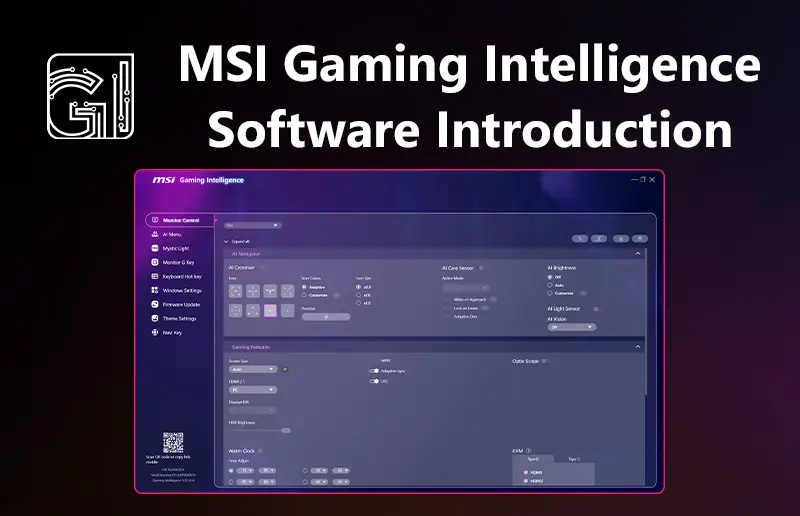
MSI has introduced Gaming Intelligence, a software tool that lets users control many of their gaming monitor’s settings directly from their PC. Instead of navigating the small on-screen menus built into the display, compatible MSI monitors can be adjusted through a desktop interface using a mouse and keyboard.

Once connected via USB, Gaming Intelligence allows users to tweak common settings such as brightness, contrast, color profiles, and input sources. The software also supports quick switching between display presets, which can be useful when moving between different games or types of content.

The platform also includes several gaming-focused features. Smart Crosshair automatically changes its color to stay visible against different backgrounds, while Night Vision brightens darker parts of a scene to make enemies easier to spot. There’s also Optix Scope, a zoom feature designed to help improve aiming precision in certain games.

For multitasking setups, Gaming Intelligence supports Picture-in-Picture (PiP) and Picture-by-Picture (PbP) modes, allowing multiple video sources to be displayed on the same monitor.

ADVERTISEMENT

The software also handles firmware updates and works alongside features found on many MSI monitors, including KVM switching for controlling multiple devices with one keyboard and mouse.

Gaming Intelligence is available for a range of MSI gaming monitors and is designed to make it easier for users to access the extra features built into modern displays.

For more information, please refer to the MSI blog post here: https://ca.msi.com/blog/msi-gaming-intelligence-software-introduction

To download the software, visit here: https://www.msi.com/support/technical_details/MNT_SW_MSI_Preloaded_Software#txt01


Tags: MSI Gaming IntelligenceMSI gaming monitor featuresMSI monitor control softwareMSI monitor softwareNight Vision MSI monitorOptix Scope MSISmart Crosshair MSI
ADVERTISEMENT
Davide Piva

Davide Piva

Professional Web Developer and Photographer, Davide is passionate about everything high resolution and mobile. One of the Founders of RHR and our dedicated mobile reviewer.

Leave Comment

Recommended.

Intel’s Holiday Hit List

Intel’s Holiday Hit List

December 15, 2025
Intel Unveils Core Ultra Processors at CES 2025

Intel Unveils Core Ultra Processors at CES 2025

January 6, 2025
ADVERTISEMENT

Trending.

MSI BE6500 WiFi 7 USB Review

MSI BE6500 WiFi 7 USB Review

Arctic Liquid Freezer III PRO 360 Review

Arctic Liquid Freezer III PRO 360 Review

Arctic Liquid Freezer III Pro 420 Review

Arctic Liquid Freezer III Pro 420 Review

Seagate Exos X24 Review

Seagate Exos X24 Review

MSI MPG X870E Carbon WiFi Review

MSI MPG X870E Carbon WiFi Review

Real Hardware Reviews

© 2013 - 2024 | Powered by Real Hardware Reviews

Navigate Site

  • Home
  • About Us
  • Contact Us
  • Privacy Policy
  • Terms and Conditions
  • Editorial & Disclosure Policy

Follow Us

No Result
View All Result
  • Home
  • Reviews
    • All Reviews
    • Accessories
    • Processors (CPU)
    • GPU
    • Mobile
    • Games & Software
    • Systems
    • Cases
    • Tablet & Laptops
    • Ram
    • Storage
    • Motherboards
  • News
  • Off Topic
    • How To
    • Cryptocurrencies

© 2013 - 2024 | Powered by Real Hardware Reviews

This website uses cookies. By continuing to use this website you are giving consent to cookies being used. Visit our Privacy and Cookie Policy.